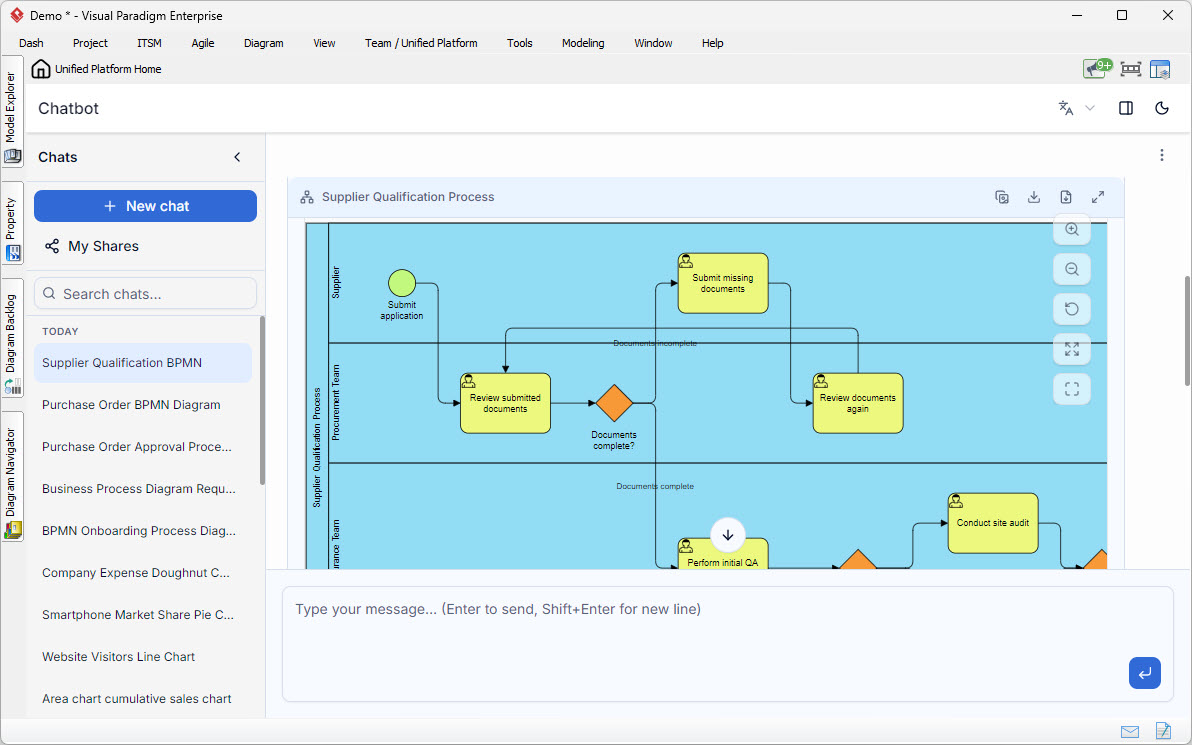
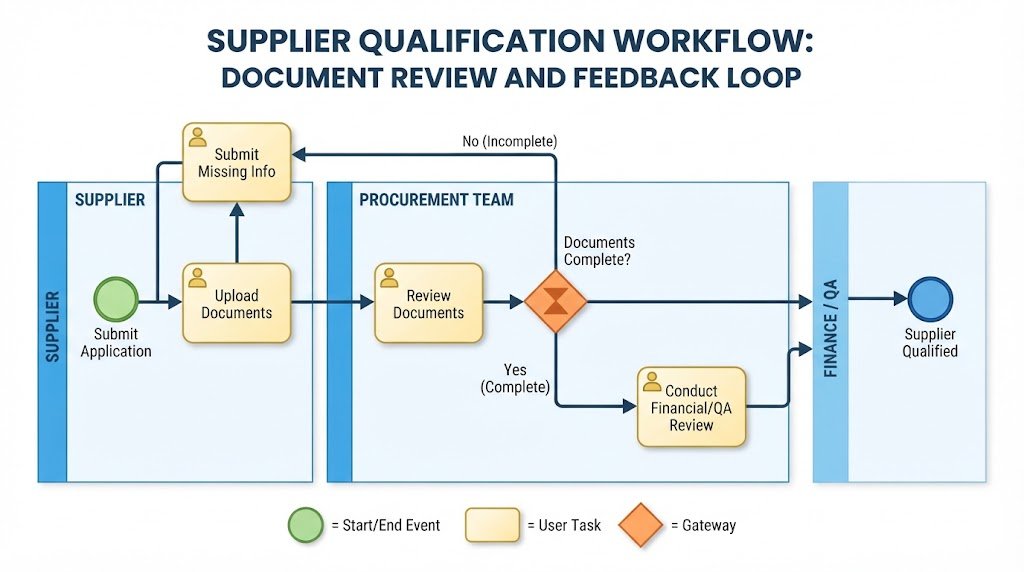
In the world of business process management, clarity is king. When organizations attempt to map out complex workflows involving multiple departments, a simple linear list of tasks often fails to capture the nuances of responsibility and decision-making. This is where Business Process Model and Notation (BPMN) combined with Swimlanes becomes an essential tool. The diagram shown in the interface above is a perfect example of a structured workflow used to qualify new suppliers, demonstrating how data flows between different organizational roles.
Understanding the Visual Structure: The Power of Swimlanes
The most striking feature of this diagram is its vertical segmentation. These are known as swimlanes. In BPMN, swimlanes are used to assign specific tasks to specific actors, roles, or systems. This visual separation answers the critical question: “Who is responsible for doing this?”
- The Supplier Lane (Top): This represents the external entity initiating the process. Their actions are limited to providing data.
- The Procurement Team Lane (Middle): This is the primary internal gatekeeper. They are responsible for the initial vetting of the supplier’s documentation.
- The Finance/QA Lane (Bottom): Although partially visible, this lane represents the deeper validation phase, involving financial checks or site audits.
By organizing the process this way, the diagram immediately communicates that the Supplier cannot perform Procurement Team tasks, and vice versa. This reduces ambiguity in real-world execution.
Decoding the BPMN Elements
To understand the logic of this workflow, we must break down the specific symbols used in the diagram. These are the building blocks of BPMN:
1. The Start Event (Green Circle)
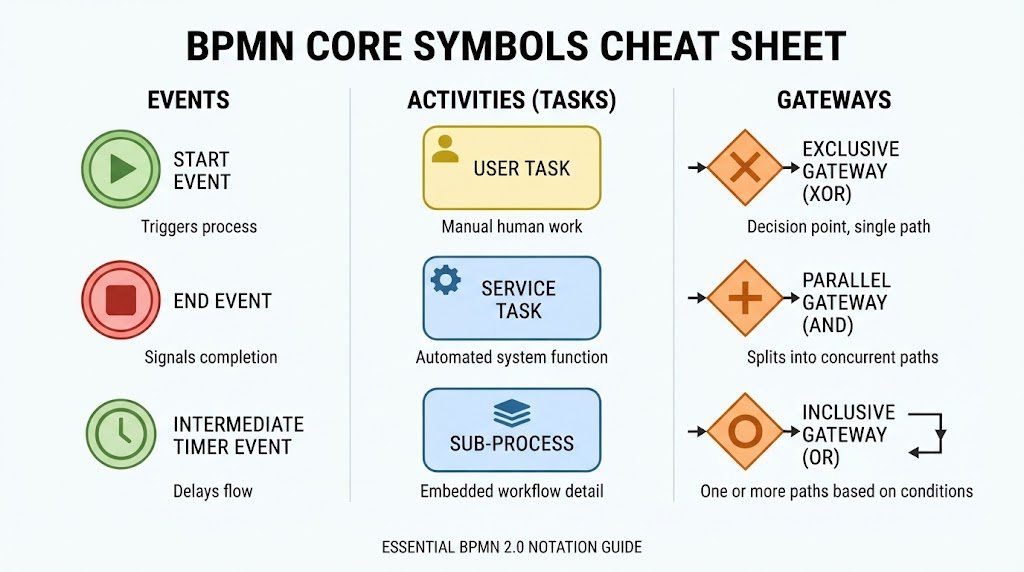
At the top left of the Supplier lane, we see a green circle labeled Submit application. In BPMN, a circle indicates an Event. A filled or colored circle like this typically marks the Start Event. It signifies that the process is triggered when the supplier decides to apply.
2. Tasks (Yellow Rounded Rectangles)
The yellow boxes with the “person” icon (representing a User Task) represent specific actions that must be completed. Examples in this diagram include:
- Submit missing documents
- Review submitted documents
- Perform initial QA
- Conduct site audit
These are the atomic units of work. In a software automation context, these would map to specific API calls, form submissions, or human-in-the-loop alerts.
3. Gateways (Orange Diamonds)
The orange diamond shapes are Gateways. They act as traffic controllers for the process flow. They introduce logic and branching. The most prominent one in this diagram is labeled Documents complete?.
Step-by-Step Process Analysis
Let’s walk through the lifecycle of a supplier qualification request as depicted in this model. This flow demonstrates a classic “Validate and Loop” pattern.
Phase 1: Initiation and Initial Review
The process begins when the Supplier submits their application. The flow moves horizontally into the Procurement Team lane, where a team member performs the task: Review submitted documents. This is a manual task requiring human judgment.
Phase 2: The Decision Point (The Gateway)
After the review, the flow hits the orange diamond gateway asking: Documents complete?. This is a binary decision point (Yes/No). The diagram uses text labels on the outgoing arrows to define the paths:
- Path A (The Loop): If the answer is “No” (implied by the arrow labeled Documents incomplete going up), the process flows back to the Supplier lane for the task Submit missing documents. This creates a feedback loop, ensuring quality before moving forward.
- Path B (The Forward Flow): If the answer is “Yes” (labeled Documents complete), the process continues downward.
Phase 3: Deep Dive and Validation
Once the documents are approved, the responsibility shifts to the lower lanes (likely Finance or Quality Assurance). The diagram shows the flow moving to a task labeled Perform initial QA. Following this, the process moves to Conduct site audit.
Technical Implications: From Diagram to Code
For software developers or system architects, this diagram is more than just a picture; it is a specification for logic. Here is how the concepts translate into technical implementation:
- State Management: The process requires a database state to track the supplier’s status. It starts at
STATUS_PENDING, moves toSTATUS_REVIEWING, and loops back toSTATUS_CORRECTION_NEEDEDif the gateway condition fails. - Conditional Logic: The diamond gateway translates directly into an
if/elsestatement in code.if (documentsComplete) { triggerTask("Perform initial QA"); } else { triggerNotification("Submit missing documents"); } - Parallel Processing: While not explicitly shown as parallel branches here, advanced versions of this model might use parallel gateways to allow the Financial Checks and Site Audits to happen simultaneously, speeding up the overall qualification time.
Conclusion
The diagram displayed in the Visual Paradigm interface serves as a robust blueprint for the Supplier Qualification Process. By utilizing swimlanes, it effectively partitions responsibilities between the Supplier, Procurement, and Finance teams. By using standard BPMN symbols like Gateways and Tasks, it defines a clear, logical flow that handles exceptions (missing documents) gracefully. This level of modeling is crucial for organizations looking to optimize efficiency, reduce errors, and potentially automate these workflows using Robotic Process Automation (RPA) or AI-driven validation tools.