


In the complex world of software architecture and business analysis, teams often face a fragmented workflow. Design tools live in desktop applications, requirements live in wikis, and code lives in repositories. This separation creates “version drift,” where the documentation no longer matches the actual system design. Visual Paradigm OpenDocs is designed to solve this specific architectural problem. This tutorial explores how OpenDocs functions as a unified, intelligent workspace, bridging the gap between descriptive text and professional visual modeling.
Part 1: The Core Architecture & Key Features
At its heart, OpenDocs is a web-based platform that integrates three distinct capabilities: diagramming, text editing, and AI assistance. Let’s break down how these features function together to create a robust documentation environment.
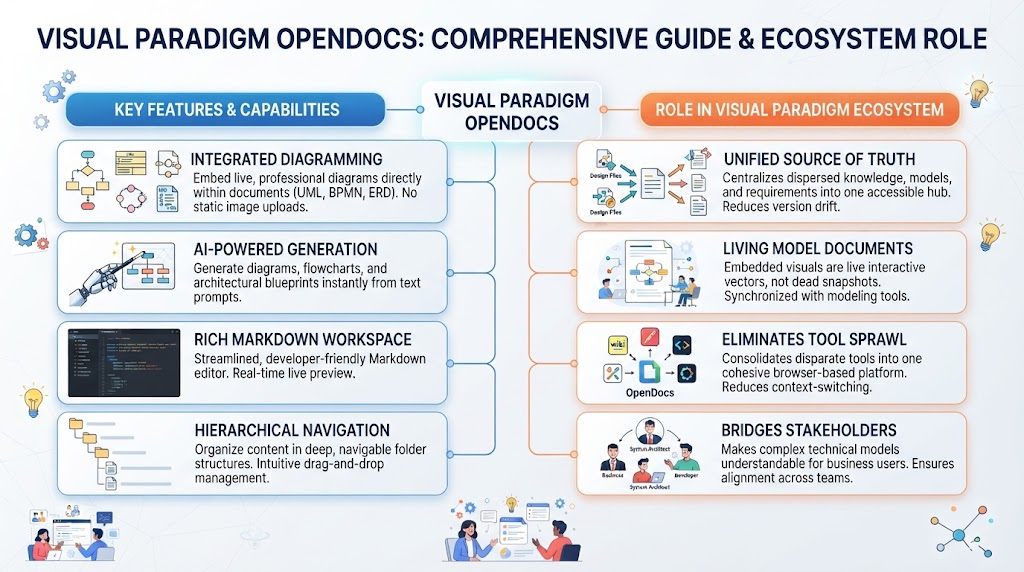
1. Integrated Professional Diagramming
Traditional documentation tools (like standard word processors or basic wiki systems) treat diagrams as static images. Once you upload a PNG or JPG, it becomes “dead”—you cannot click a box to see its properties, nor can you trace a line to its source code. OpenDocs embeds a full-featured diagram editor directly into the document.
- Live Vectors: Diagrams are not just pictures; they are interactive data structures.
- Industry Standards: The platform supports robust modeling languages including
UML(Class, Sequence, Use Case, Activity),BPMNprocess flows,ERDs(Entity Relationship Diagrams), and cloud architecture diagrams. - No Upload Friction: You draw directly on the canvas rather than creating an external file and uploading it.
2. AI-Powered Generation & Collaboration
One of the biggest bottlenecks in technical writing is the time it takes to layout diagrams. OpenDocs leverages Natural Language Processing (NLP) to accelerate this process.
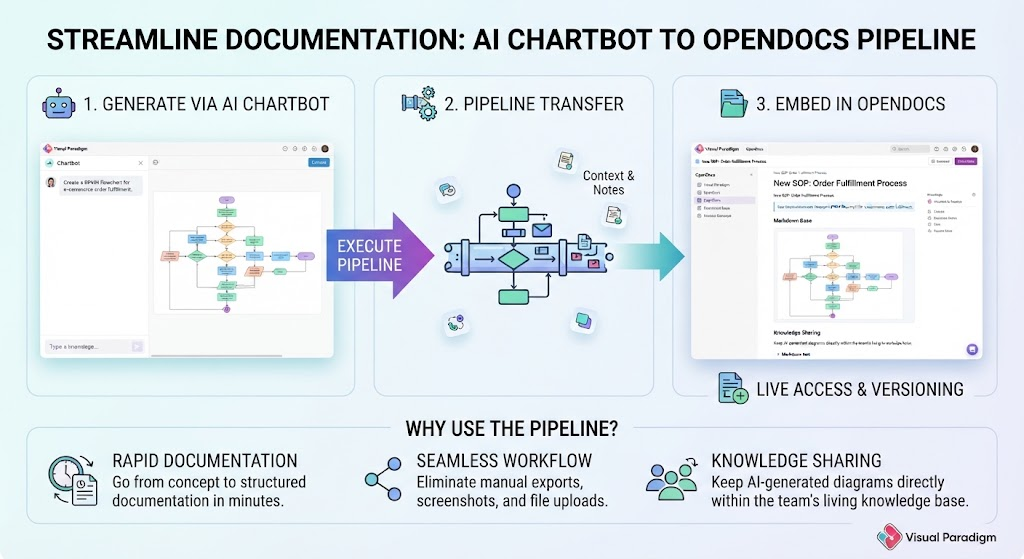
Instead of manually dragging and dropping boxes, users can leverage natural language prompts. For example, a user might type, “Create a sequence diagram for a user logging in with 2FA”, and the AI generates the structured flowchart instantly. This allows architects to focus on the logic of the system rather than the geometry of the drawing.
3. The Rich Markdown Workspace
While diagrams are visual, context is often textual. OpenDocs provides a streamlined, developer-friendly Markdown editor. This is crucial for teams that prefer speed and structure over WYSIWYG (What You See Is What You Get) bloat.
- Real-time Live Preview: See your document formatted as you type.
- Code Syntax Highlighting: Essential for developers embedding code snippets directly into requirements.
- Structured Formatting: Utilizes tables, blockquotes, and headers to organize complex information.
4. Hierarchical Tree Navigation
As documentation scales, organization becomes critical. OpenDocs replaces flat file lists with a deep, navigable folder structure. Using intuitive drag-and-drop management, teams can organize content into logical hierarchies, ensuring that a project’s knowledge base scales cleanly without becoming a tangled mess of files.
Part 2: The Role in the Visual Paradigm Ecosystem
OpenDocs is not just a standalone tool; it plays a pivotal role in the wider Visual Paradigm ecosystem. It acts as the “glue” that connects isolated modeling assets into accessible, synchronized corporate intelligence. Here is how it transforms the enterprise workflow.
1. Unifying the “Source of Truth”
Historically, system designs lived inside desktop modeling tools, while project documentation lived in separate wiki systems. This caused severe version drift. OpenDocs acts as the central destination hub, connecting desktop design files and online editors directly to documentation pages. This ensures that the Source of Truth is singular and accessible.
2. Shifting from Static Snapshots to Living Models
In OpenDocs, embedded visuals are live interactive vectors rather than dead snapshots. This is a paradigm shift for stakeholder engagement:
- Interactivity: Stakeholders and developers can interact with diagrams inline.
- Traceability: Elements can be traced back to core project repositories.
- Synchronization: Models maintain continuous synchronization across iterative updates. If the design changes, the documentation updates.
3. Eradicating Tool Sprawl and Context-Switching
Software teams often suffer from “context switching”—the cognitive load of constantly bouncing between a drawing tool, a code editor, and a document repository. By merging a high-performance markdown writing environment, an AI assistant, and an industrial-strength diagramming suite into a single browser-based application, OpenDocs removes this workflow friction.
4. Bridging Technical and Business Stakeholders
Finally, OpenDocs serves as a communication bridge. Through its clean visual rendering and AI-assisted prompt features, it makes complex enterprise frameworks (such as architecture roadmaps or technical workflows) digestible for non-technical leadership. It retains the strict precision required by engineering teams while presenting a user-friendly interface for business users.
Conclusion
Visual Paradigm OpenDocs represents a maturation of the documentation landscape. By moving away from static images and disparate tools, it offers a “living” approach to system design. For any team looking to reduce version drift and improve the alignment between business goals and technical execution, OpenDocs provides the architectural foundation necessary for modern software development.
Related posts:
 Mastering Knowledge Management: A Deep Dive into Visual Paradigm OpenDocs & Pipeline Architecture
 Mastering the Modern Modeling Workflow: AI Chatbot vs. VPasCode in Visual Paradigm
 Mastering Dynamic Documentation: A Deep Dive into Visual Paradigm’s OpenDocs & Pipeline Integration
 Mastering the AI-to-Documentation Pipeline: From Chatbot Prompts to Living Knowledge Bases