


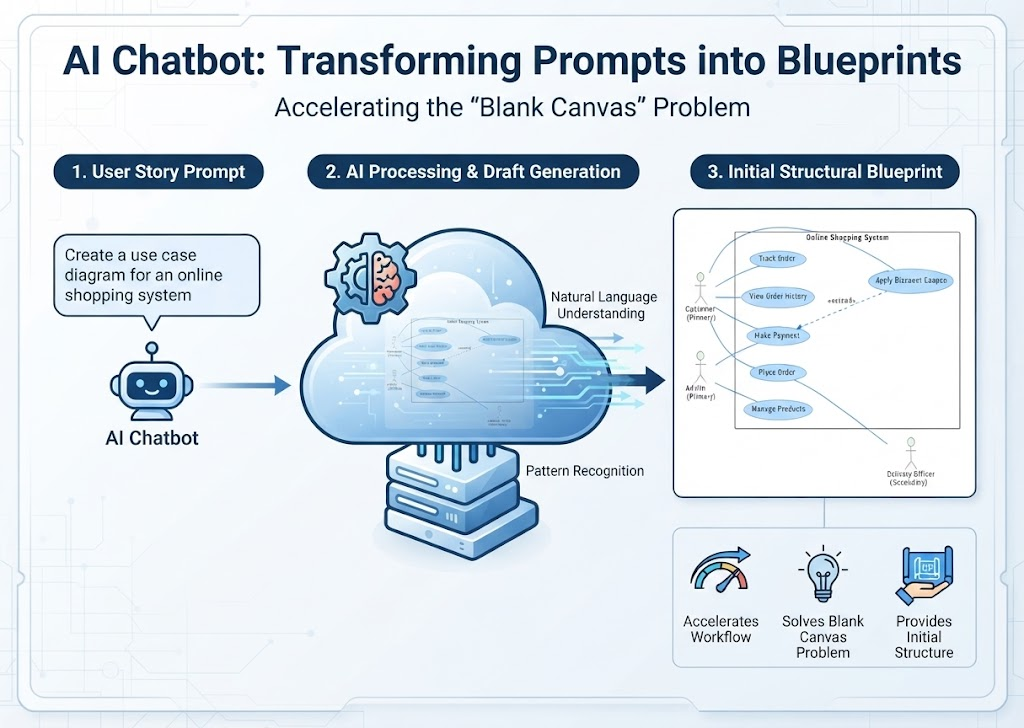
In the world of software engineering and system architecture, the most daunting moment often occurs right at the beginning: staring at a blank canvas. Whether you are designing a database schema or a UML diagram, the leap from a vague idea to a structured technical specification can be slow and difficult. This tutorial explores a modern solution to this challenge: the AI Chatbot as an intelligent drafting agent.
Based on the workflow shown below, we will break down how a natural language prompt is transformed into a professional-grade structural blueprint, accelerating your design workflow significantly.
1. The Input: Defining the User Story
The process begins with a simple, natural language request. In the diagram, the user provides a specific instruction to the AI agent:
“Create a use case diagram for an online shopping system”
This is known as a User Story Prompt. Unlike traditional modeling tools where you must manually drag and drop shapes onto a canvas, here the intent is communicated through language. The AI acts as a bridge, interpreting high-level business requirements into technical components.
- The Actor Identification: The AI understands that an “online shopping system” implies a Customer who interacts with the system.
- The Functional Scope: The phrase “shopping system” triggers a standard set of expectations: browsing, ordering, and payment processing.
2. The Engine: AI Processing and Draft Generation
Once the prompt is received, the request enters the cloud-based processing engine. This stage is often described as the “black box” of AI, but it relies on two key technical concepts:
Natural Language Understanding (NLU)
The AI analyzes the grammatical structure and keywords of the prompt. It identifies the domain (e-commerce) and the desired output format (a Use Case Diagram).
Pattern Recognition
This is the core capability that solves the “blank canvas” problem. The AI has been trained on thousands of system designs. When it hears “online shopping,” it recognizes the standard patterns of actors and use cases associated with that domain. It doesn’t just guess; it retrieves known architectural patterns and applies them to the specific request.
3. The Output: Initial Structural Blueprint
The result of this processing is a concrete, visual artifact: the Initial Structural Blueprint. In the provided example, the AI generated a UML Use Case Diagram. Let’s analyze the technical elements of this output:
Actors and Roles
The diagram correctly identifies three distinct roles, demonstrating the AI’s understanding of system boundaries:
- Customer (Primary Actor): The main user initiating actions like “Place Order” and “Track Order.”
- Admin (Primary Actor): A system administrator who manages backend operations like “Manage Products.”
- Delivery Officer (Secondary Actor): An external entity that supports the system, typically involved in the fulfillment process.
Use Cases and Relationships
The AI populated the system boundary with specific functional requirements:
- Core Functions: Place Order, Make Payment, View Order History.
- Extended Relationships: Notice the dashed line connecting Track Order to Place Order labeled
«extends». This indicates that tracking is an optional behavior that happens after a primary order is placed. This level of nuance shows the AI understands UML semantics, not just drawing shapes.
Why This Matters: Solving the “Blank Canvas” Problem
Traditional diagramming requires you to know exactly what shapes to use and how to connect them. The AI Chatbot approach offers three distinct advantages:
- Accelerates Workflow: Instead of spending hours setting up the canvas, you get a draft in seconds. You can focus on refining the logic rather than the mechanics of drawing.
- Solves the Blank Canvas Problem: It provides immediate structure. Even if your initial idea was vague, the AI forces it into a coherent structure.
- Provides Initial Structure: It serves as a “first draft” for peer review or further refinement, giving stakeholders something concrete to critique immediately.
By leveraging AI as a drafting partner, you transform the system design process from a blank slate of uncertainty into a structured conversation about your software architecture.
Related posts:
 Mastering the Visual Paradigm Ecosystem: From Concept to Code with The Pipeline
 Mastering Unified Modeling: The Architecture of Enterprise Agility with Visual Paradigm
 Mastering the Modern Software Design Workflow: From Ideation to Living Documentation with Visual Paradigm
 Mastering Enterprise Architecture with Visual Paradigm: A Unified Modeling Ecosystem