Introduction to As-Is Process Modeling
Welcome to this tutorial session on Business Process Modeling. Today, we will dive deep into the concept of an As-Is Process. This is the foundational step in business process improvement. Before we can fix a process, we must first understand exactly how it currently operates. We will use a practical example from an online shop to illustrate how to capture, analyze, and model a real-world workflow using Business Process Model and Notation (BPMN).
In this session, we will break down a specific scenario involving a customer placing an order and a sales representative fulfilling it. By the end, you will understand how to identify inefficiencies (gaps) and design a better future state (To-Be).
Deconstructing the As-Is Scenario
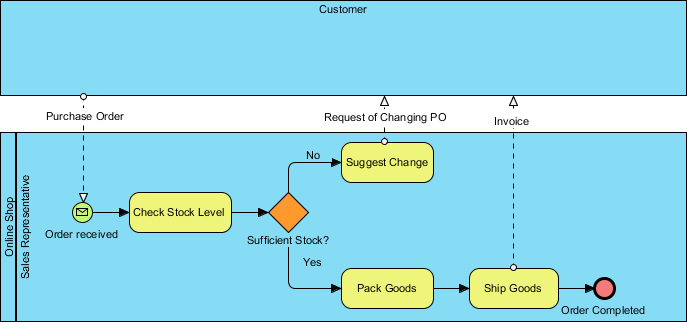
Let us examine the process flow depicted in our example. In BPMN, we organize activities into swimlanes to clearly assign responsibility. Here, we see two distinct lanes: the Customer and the Online Shop (specifically the Sales Representative).
Tracing the Flow
The process is initiated by a Message Event, represented by the envelope icon labeled “Order received.” This signifies that an external entity (the Customer) has sent a Purchase Order. This is a crucial boundary crossing in BPMN, showing communication between different participants.
Once the order is received, the responsibility shifts entirely to the Sales Representative. The first activity is a task labeled “Check Stock Level”. In this As-Is state, this is a manual check. The representative likely looks at a physical ledger or a basic database to verify availability.
Following the check, the process hits a Exclusive Gateway (the diamond shape) labeled “Sufficient Stock?”. This is a decision point that dictates the path of the process:
- The “Yes” Path: If stock is available, the flow moves to “Pack Goods” and then “Ship Goods.” Finally, an invoice is sent back to the customer, and the process concludes with a End Event marked as “Order Completed.”
- The “No” Path: If stock is insufficient, the representative must engage with the customer again. This task is labeled “Suggest Change,” implying a manual communication loop where the customer must amend their purchase order.
Modeling with Visual Paradigm
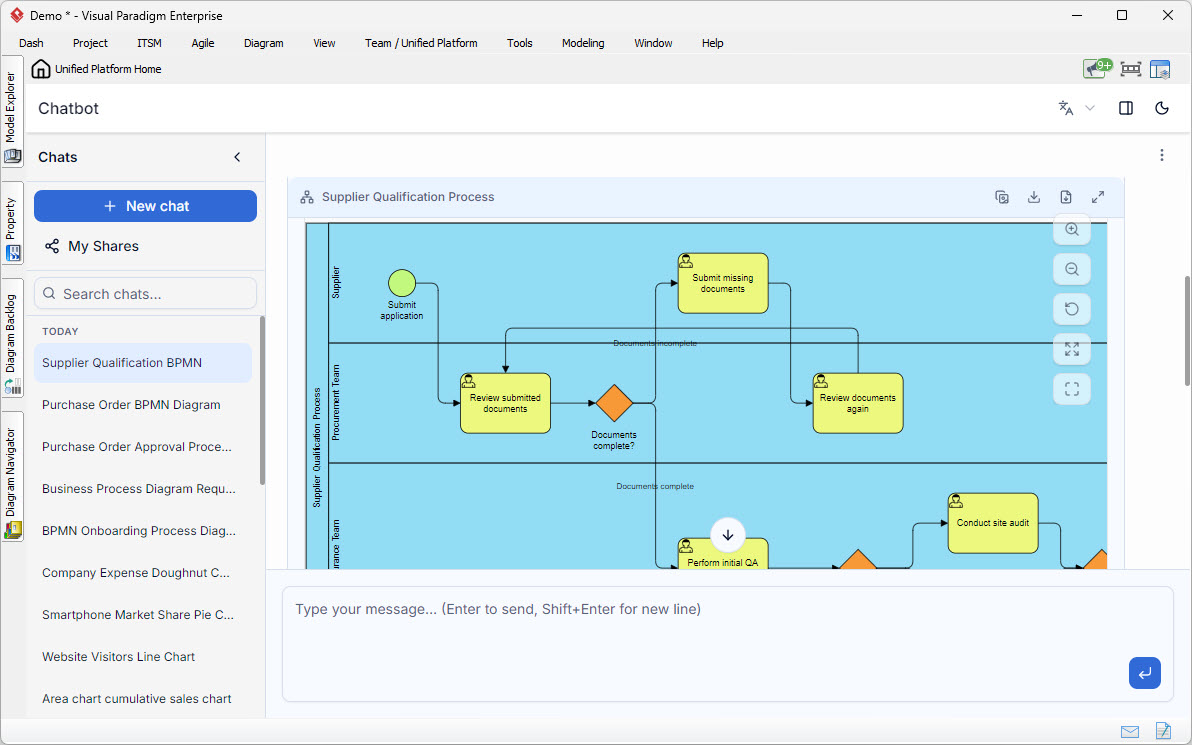
When you are capturing this As-Is process, Visual Paradigm acts as your digital canvas. Its intuitive drag-and-drop interface allows you to place these BPMN elements onto the canvas effortlessly. For instance, snapping the Message Event to the boundary of the “Online Shop” lane ensures that the system understands this is an incoming trigger. The “Auto-layout” feature in Visual Paradigm is particularly helpful here; if you accidentally place a gateway too close to a task, the tool can automatically rearrange the diagram to ensure readability, a common pitfall for beginners.
Identifying the Gap in the Current Process
Now that we have modeled the As-Is state, we must act as critical analysts. We need to identify the “Gap”—the difference between the current performance and the desired performance or industry standards.
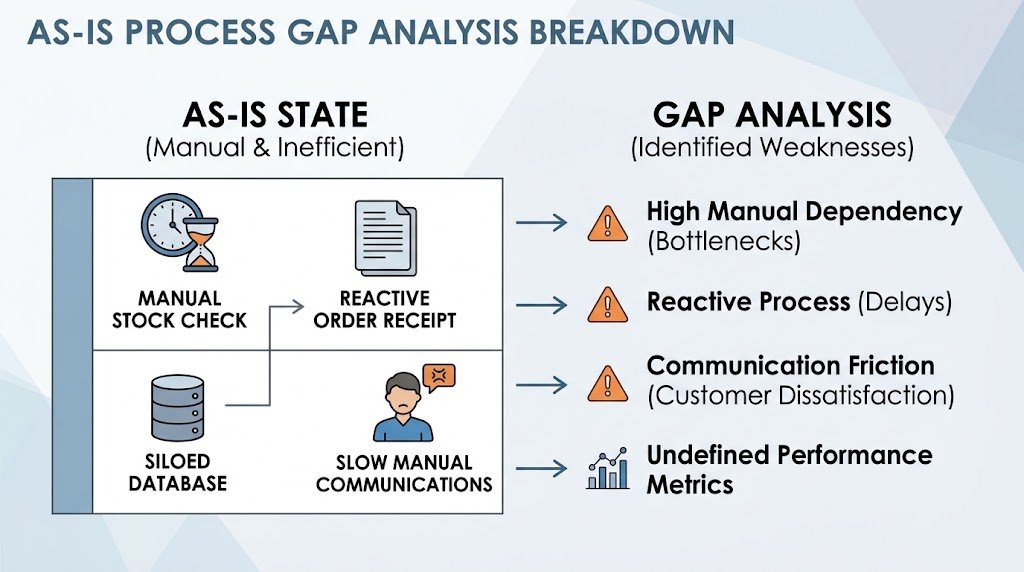
Looking at this diagram, several inefficiencies stand out:
- Manual Dependency: The entire process hinges on the “Sales Representative.” If they are unavailable, sick, or overwhelmed, the process halts. There is no automated trigger.
- Reactive vs. Proactive: The process is reactive. It only reacts to a Purchase Order. There is no proactive inventory management or pre-emptive notification system.
- Communication Friction: The “Suggest Change” path is a manual loop. If a customer has to email back and forth to change an order due to stock issues, the lead time increases significantly, leading to customer dissatisfaction.
Deriving the To-Be Scenario
To address these gaps, we must design a To-Be Process. This is the optimized version of the workflow. In our new scenario, we want to minimize human intervention and automate the decision-making process.
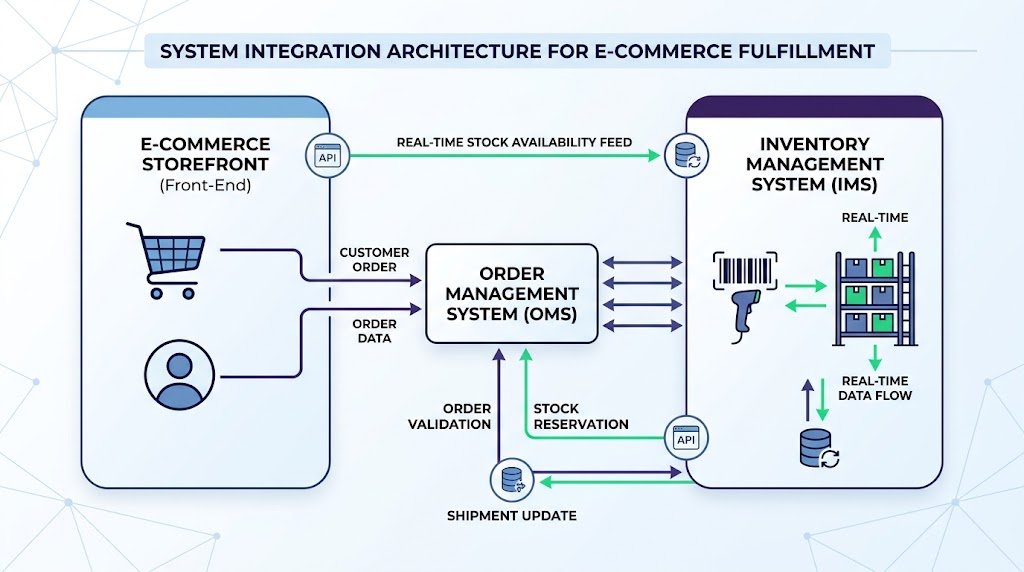
Here is how the To-Be scenario would look:
- Automated Trigger: When a customer places an order on the website, the system automatically captures it. No manual “Order received” event is needed.
- System-Based Decision: The inventory management system automatically checks stock levels. It does not wait for a human to “Check Stock Level.”
- Conditional Logic:
- If stock is sufficient: The system automatically generates a packing slip and a shipping label. It sends an email to the warehouse.
- If stock is insufficient: The system automatically sends an email to the customer suggesting alternatives or placing them on a “Backorder” list, without waiting for human intervention.
- Real-time Updates: The customer receives a real-time tracking number immediately upon shipping.
Recommended Actions and Implementation
To move from the As-Is to the To-Be state, the organization needs to take specific actions. This is often referred to as Process Reengineering.
1. System Integration: You need to integrate your Order Management System (OMS) with your Inventory Management System (IMS). Visual Paradigm allows you to model these system integrations as sub-processes or by using specific gateway types to represent complex logic.
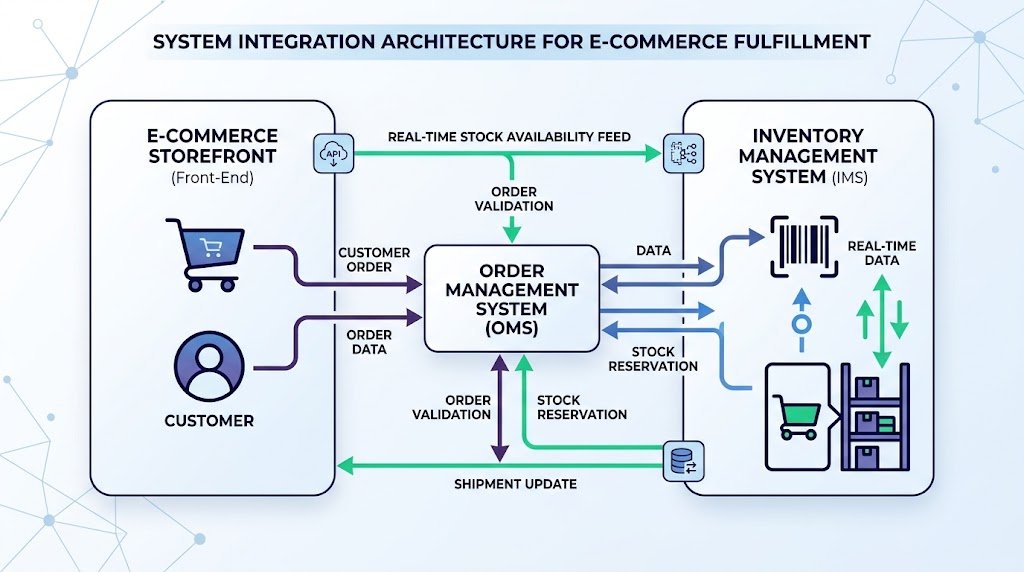
2. Automation of Communication: Replace the manual “Suggest Change” task with automated email templates. If the stock is low, the system should trigger a predefined email workflow.
3. Elimination of the Sales Representative Role: In the final optimized model, the “Sales Representative” lane might be removed entirely for standard orders, or their role might shift to handling exceptions only (e.g., custom orders).
Summary of Findings
In this tutorial, we have successfully modeled an As-Is process for an online shop using BPMN. We traced the journey from a customer’s Purchase Order to the final shipment, identifying the critical decision point regarding stock availability.
By analyzing this model, we identified that the current process is heavily reliant on manual intervention, creating bottlenecks and potential delays. Our derived To-Be scenario proposes a fully automated workflow that leverages system logic to handle stock checks and customer communication instantly.
Using tools like Visual Paradigm, you can not only document these changes but also simulate them to predict performance metrics, such as processing time and resource utilization, before implementing them in the real world. This iterative approach ensures that your business processes are not just documented, but continuously improved.