


The Evolution of Software Architecture Visualization
Welcome, developers. Today, we are tackling a persistent challenge in modern software engineering: the disconnect between writing code and documenting its architecture. For years, the industry has struggled with maintaining accurate, up-to-date diagrams. In this session, we will explore a revolutionary approach to this problem using a tool called VPasCode, which leverages AI to create seamless architectural diagrams directly within your development environment.
Let’s break down the transition from the traditional, fragmented workflow to a modern, integrated flow.
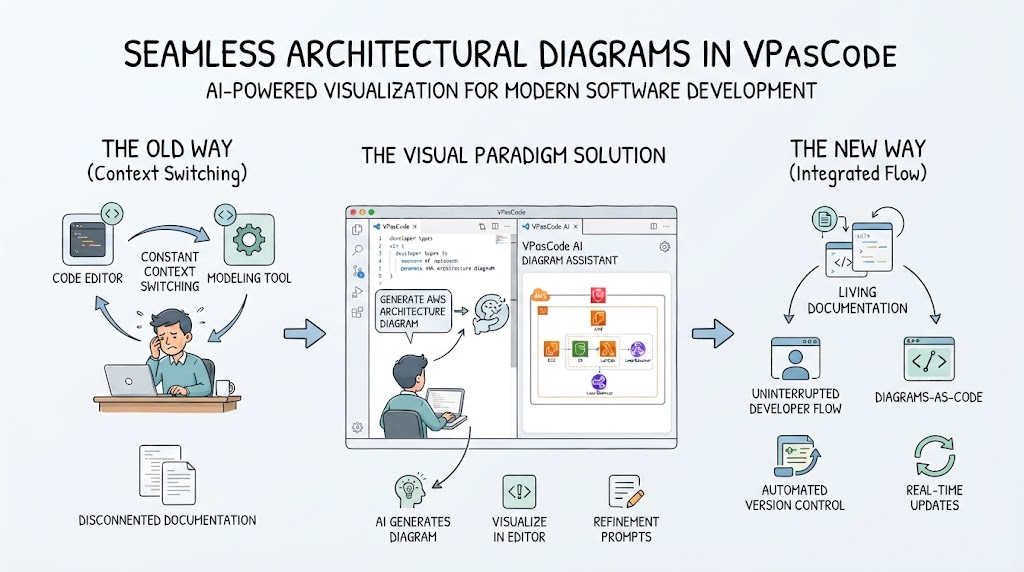
The Old Way: The Burden of Context Switching
Historically, the process of documenting system architecture has been disjointed. As you can see in the first section of our discussion, developers often faced a workflow defined by constant context switching. Imagine you are deep in the code, making critical architectural decisions. Suddenly, you need to visualize this. You are forced to leave your code editor, switch to a separate modeling tool, manually draw boxes and arrows, and then switch back to code.
- Constant Context Switching: Moving between a code editor and a distinct modeling tool breaks your concentration and reduces productivity.
- Disconnected Documentation: Because the diagrams are often created in isolation, they frequently become outdated the moment the code changes. This leads to a state where the documentation no longer reflects the reality of the software.
The Visual Paradigm Solution: AI in the Editor
Enter the solution designed to bridge this gap. The core of this new approach is the VPasCode AI Diagram Assistant. This tool fundamentally changes where and how diagrams are created. Instead of an external application, the visualization engine lives right inside your code editor.
The workflow here is intuitive and powerful. As you write code or define developer types, the AI assistant is ready to interpret your intent. You can simply prompt it to “Generate AWS Architecture Diagram,” and it instantly renders a visual representation of your infrastructure.
This section of the workflow highlights three critical capabilities:
- AI Generates Diagram: Automatic creation of complex visualizations based on text or code context.
- Visualize in Editor: Keeping the view within the IDE to maintain focus.
- Refinement Prompts: The ability to interact with the AI to tweak and perfect the diagram without leaving your workflow.
The New Way: An Integrated Flow for Living Documentation
The ultimate goal is to achieve a state of “Integrated Flow.” By integrating diagram generation directly into the coding process, we transform static documents into living documentation. This is not just about drawing pictures; it is about creating a synchronized ecosystem where code and documentation evolve together.
When you adopt this new way of working, several significant benefits emerge that streamline the entire development lifecycle:
- Uninterrupted Developer Flow: You stay in the zone. There is no need to switch tabs or applications, allowing for deeper focus and faster development speeds.
- Diagrams-as-Code: By treating diagrams as code artifacts, you ensure they are versioned, reviewed, and managed just like your source code.
- Automated Version Control: Changes to your architecture are tracked automatically, eliminating the “it worked on my machine” problem for documentation.
- Real-Time Updates: As the code changes, the diagram updates. This ensures that your visual documentation is always a true reflection of your system’s current state.
In conclusion, moving from the old way of manual modeling to the AI-powered, integrated flow of VPasCode represents a massive leap forward in software development efficiency. It allows you to focus on building great software while ensuring your documentation keeps pace with your innovation.