


Bridging Code and Design: Mastering Diagram-as-Code with VPasCode
In the modern software development lifecycle, the gap between writing code and visualizing system architecture can often lead to miscommunication and design drift. Traditionally, developers have had to choose between writing verbose code without a visual guide or manually drawing diagrams that quickly become outdated. However, with the advent of Diagram-as-Code tools like VPasCode within the Visual Paradigm ecosystem, we can now write our system designs in plain text and have them rendered instantly into professional diagrams. This approach combines the precision of coding with the clarity of visual modeling.
In this tutorial, we will explore how VPasCode facilitates the creation of robust UML Class Diagrams by translating text definitions into visual representations, using the example of an e-commerce order system.
Defining Your Domain with Text
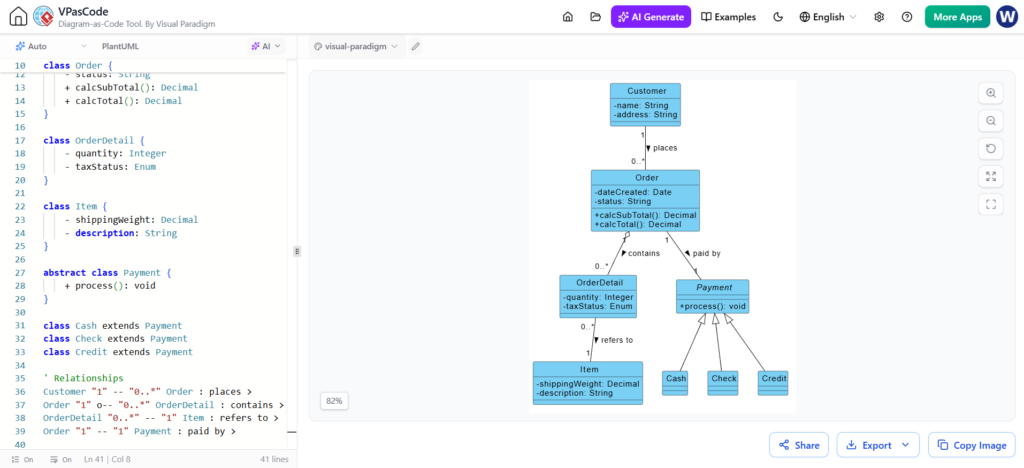
The core philosophy behind VPasCode is that your diagram should be as editable as your source code. In the left pane of the tool shown above, we see a script written in PlantUML syntax. This allows developers to define their domain model using simple text blocks. Instead of dragging boxes onto a canvas, you simply declare your classes and their properties.
For instance, looking at the definition of the Order class:
- Class Declaration: The syntax
class Ordercreates the foundational block. - Attributes: Properties like
-status: Stringare defined with their names and data types. The minus sign indicates private visibility, while a plus sign would indicate public visibility. - Methods: Functions such as
+calcSubTotal()are listed within the class block, defining the behavior of the object.
This text-based approach ensures that your design documentation stays synchronized with your actual implementation, making it much easier to maintain over time.
Modeling Inheritance Hierarchies
One of the most powerful features of Object-Oriented Design is inheritance, allowing you to create specialized classes based on general ones. VPasCode handles this elegantly. In our screenshot, we see a clear hierarchy centered around payments.
We define an abstract class Payment. This is a crucial concept in system design; it acts as a blueprint that cannot be instantiated directly but provides a common interface for all payment methods. The syntax class Cash extends Payment (and similarly for Check and Credit) explicitly tells the tool how these specific classes relate to the parent. In the generated diagram on the right, this relationship is visualized with a solid line and a hollow triangle arrow pointing from the child classes to the parent, adhering to standard UML notation.
Visualizing Relationships and Cardinality
While defining individual classes is important, the true power of a Class Diagram lies in showing how these classes interact. VPasCode allows you to define these relationships using a concise textual format at the bottom of the editor.
Consider the relationship between an Order and an OrderDetail. In the screenshot, we see the syntax:
Order "1" -- "0.." OrderDetail : contains
This line does a lot of heavy lifting:
- Connectivity: The double dash
--signifies a standard association. - Cardinality: The numbers
"1"and"0.."define the multiplicity. It tells us that one Order must contain zero or more OrderDetails. - Role Name: The word
containslabels the relationship line, making the diagram self-explanatory.
When VPasCode renders this on the right, you see the lines connecting the boxes with the correct arrowheads and labels, instantly communicating the structure of the business logic without you needing to manually position or route the lines.
Why Use VPasCode in Visual Paradigm?
Visual Paradigm has long been a leader in visual modeling, but VPasCode adds a layer of efficiency that appeals specifically to developers. By allowing you to edit the diagram via text, you gain several advantages:
- Speed: It is often faster to type a relationship definition than to click, drag, and align shapes.
- Version Control: Text files are merge-friendly. You can track changes to your architecture in Git just like your source code, preventing the “diagram hell” where files are overwritten by different team members.
- Consistency: The tool ensures that the visual output strictly follows the syntax you wrote, reducing human error in drawing.
Whether you are designing a complex payment gateway or a simple inventory system, tools like VPasCode ensure that your architectural intent is captured precisely and shared effectively across your team.