


Welcome to this comprehensive tutorial on navigating the initial stages of the Enterprise Architecture (EA) lifecycle. In the world of TOGAF 10th Edition, the journey begins not with diagrams, but with preparation. This guide will walk you through the Preliminary Phase—the critical foundation where the architecture capability is defined—using the powerful synergy of Visual Paradigm and ArchiMate.
Understanding the Preliminary Phase
The Preliminary Phase is the “Phase 0” of the Architecture Development Method (ADM). Its primary goal is to define the “architecture capability” for your organization. Before we can design a solution, we must understand the rules of the game: Who are we? What are our drivers? And what tools and principles will we use?
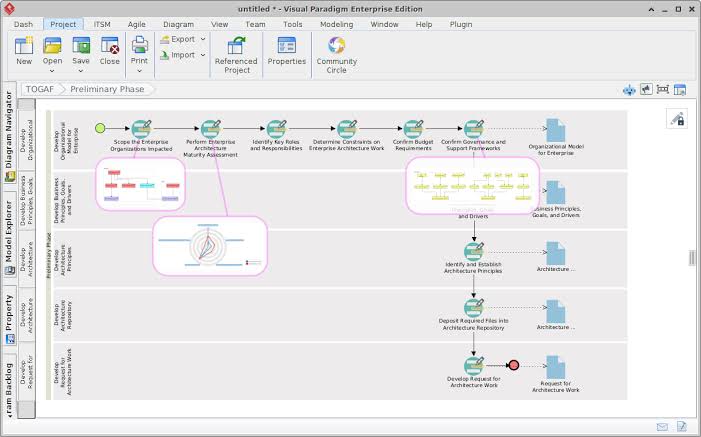
Visualizing this phase is complex because it involves multiple streams of work happening in parallel. The image provided illustrates this complexity, showing a “Preliminary Phase” roadmap in Visual Paradigm. Let’s break down the specific technical components shown in this workflow.
1. Scoping and Strategic Alignment
At the top of the workflow, you see the initial steps: Scope the Enterprise Organizations Impacted and Perform Enterprise Architecture Maturity Assessment.
- Scoping: This involves identifying the stakeholders and the organizational boundaries. In the diagram, this is represented by a high-level process node.
- Maturity Assessment: This is a critical diagnostic step. You are assessing how mature the organization is in handling architecture work.
Visual Paradigm Insight: Notice the magnified view in the screenshot. The diagram utilizes a Context Diagram or a specialized Heatmap/Matrix view to visualize the scope. This allows the “Doer” to see at a glance which departments are involved and which maturity levels need improvement.
2. The Organizational Model
One of the most crucial outputs of the Preliminary Phase is the Organizational Model for Enterprise. This defines the structure of the architecture team and the governance framework.
ArchiMate Modeling Concept: The screenshot highlights a specific architectural element: the Organizational Model. In ArchiMate terminology, this is typically modeled using the Organization and Role concepts.
- Organization: Represents a group of people (e.g., “Enterprise Architecture Team”).
- Role: Represents the function performed by the organization (e.g., “Architect”, “Sponsor”).
In Visual Paradigm, this is visualized as a hierarchical structure. The “Sponsor” drives strategy, the “Manager” builds capability, and the “Doer” executes phases. The tool allows you to link these roles to specific responsibilities, ensuring that governance is not just a concept, but a defined structural element of your enterprise.
3. Principles and Drivers
The next major block in the workflow focuses on Principles, Goals, and Drivers. These are the immutable rules and motivations that guide all future architectural decisions.
- Principles: These are general rules and guidelines (e.g., “Data is an asset,” “Security is paramount”).
- Drivers: These are the forces driving the need for change (e.g., “Regulatory Compliance,” “Market Expansion”).
Technical Visualization: The screenshot shows a detailed view of “Principles, Goals, and Drivers.” This is a critical Gap Analysis tool. By mapping these drivers against the current state, architects can identify where the organization needs to go. Visual Paradigm’s AI-enhanced features can help generate these models automatically, ensuring that no critical driver is missed during the initial scoping.
4. The Architecture Repository and Governance
The final stage shown in the workflow is the establishment of the Architecture Repository and the request for architecture work. This is where the “Doer” officially begins the ADM cycle.
Key Concept: The Architecture Repository is a storage location for the architecture assets (models, principles, requirements) created during the process. The workflow explicitly shows the step to “Deposit Required Files into Architecture Repository.” This ensures that the Preliminary Phase isn’t just a one-time meeting but results in a tangible, searchable asset library.
How Visual Paradigm + TOGAF + ArchiMate Enhances the Process
Why use Visual Paradigm for this specific phase? The integration of these three technologies creates a powerful ecosystem:
1. Unified Visualization of the ADM
The screenshot demonstrates how Visual Paradigm renders the TOGAF ADM as a flowchart. Instead of reading text descriptions of Phase 0, you see the dependencies. You can see that you cannot define “Architecture Principles” until you have “Identified Key Roles.”
2. ArchiMate Compliance and Detail
ArchiMate provides the specific language for the “Organizational Model.” Visual Paradigm supports the full ArchiMate 3.1 specification, allowing you to model the relationships between Business Architecture (the roles), Application Architecture (the tools used), and Data Architecture (the repository). This ensures that your Preliminary Phase is not just a management exercise but a technical blueprint.
3. AI-Enhanced Efficiency
The prompt mentions “AI-enhanced features.” In the context of the Preliminary Phase, this means the tool can:
- Auto-generate models: Create the initial “Organizational Model” based on a simple text input of your company structure.
- Smart Gap Analysis: Compare your current “Maturity Assessment” against industry standards to suggest improvements.
- Collaborative Governance: Allow multiple architects to work on the “Principles” simultaneously, ensuring consistency.
Conclusion
The Preliminary Phase is the bedrock of successful Enterprise Architecture. By leveraging Visual Paradigm’s visualization capabilities and ArchiMate’s standardized modeling language, you transform the abstract concepts of TOGAF into a tangible, actionable roadmap. As shown in the screenshot, the process is a structured journey from scoping to governance, ensuring that every subsequent architecture project is built on a solid foundation.
Related posts:
 Mastering Enterprise Architecture: A Step-by-Step Guide to the Four Core Purposes
 Mastering Enterprise Architecture: A Step-by-Step Guide to the Six Core Pillars of TOGAF
 Mastering Enterprise Architecture: A Strategic Guide to the TOGAF Framework
 Mastering the TOGAF Library Ecosystem: From Concept to Modeling with Visual Paradigm