In the realm of business process management, clarity is currency. When organizations attempt to map out complex workflows, they often find themselves lost in a sea of text descriptions. This is where Business Process Model and Notation (BPMN) becomes an indispensable tool. It serves as the universal language for business analysts, developers, and stakeholders to visualize, analyze, and optimize business processes.
In this tutorial, we will deconstruct a practical example: the Order Fulfillment Process. By examining the system architecture and modeling concepts behind this diagram, you will learn how to structure your own processes using Pools, Lanes, and Message Flows.
1. The Architecture: Pools and Participants
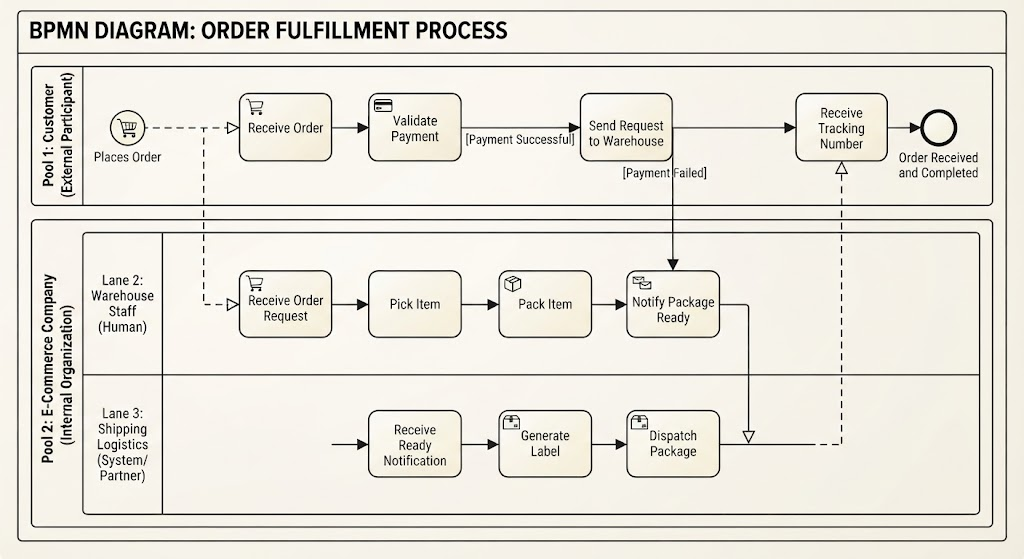
The foundation of any BPMN diagram is the Pool. A pool represents a distinct participant in a process. In the diagram provided, we see a clear separation of concerns between an external entity and an internal organization.
- Pool 1: Customer (External Participant)
This pool represents the “trigger” of the process. The customer is an external actor who initiates the workflow but does not necessarily interact with every internal step. In BPMN terms, this pool is often treated as a “black box” from the perspective of the internal organization.
- Pool 2: E-Commerce Company (Internal Organization)
This large container represents the entire organization responsible for fulfilling the order. It encapsulates all internal departments, systems, and logistics partners involved in the transaction. Notice that the boundary of this pool defines the scope of the system we are modeling.
2. The Division of Labor: Lanes and Roles
Once a Pool is defined, we use Lanes to divide the process into specific responsibilities. Lanes act as organizational units, departments, or system components. They help visualize the “Swimlane” concept, where tasks are assigned to specific actors.
Let’s break down the specific lanes in this model:
Lane 1: Sales System (Automated)
Although visually grouped with the Customer in the flow logic, this lane represents the internal Sales Department or the automated software handling the transaction. Its primary role is validation. It receives the order and checks for payment success before authorizing the fulfillment.
Lane 2: Warehouse Staff (Human)
This lane is assigned to the physical fulfillment team. It represents the human element of the process. The tasks here—Pick Item and Pack Item—are manual operations that require physical interaction with inventory.
Lane 3: Shipping Logistics (System/Partner)
This lane represents an external partner or an automated logistics system (like FedEx, UPS, or DHL integration). It handles the final stage: generating labels and dispatching the package. By placing this in its own lane, we clearly separate internal operations from external logistics.
3. The Flow Logic: From Start to Finish
The true power of BPMN lies in the sequence flows (solid lines) and message flows (dashed lines) that connect these tasks. Let’s walk through the lifecycle of an order.
Step 1: Initiation (The Trigger)
The process begins in the Customer Pool with a Start Event (the shopping cart icon). The action taken is Places Order. This action is a Message Flow (indicated by the dashed line with a white arrowhead), meaning it crosses the boundary of the organization. The customer is essentially sending a message to the Sales System.
Step 2: Validation and Handoff
Inside Pool 2, the Sales System receives the order via the Receive Order task. The next step is Validate Payment.
- Success Path: If payment is successful, a sequence flow moves the process to Send Request to Warehouse.
- Failure Path: If payment fails, the flow terminates or loops back (though typically, a failed payment would lead to an error handling sub-process, which isn’t explicitly detailed in the success path).
Step 3: Fulfillment (The Warehouse)
The request crosses the boundary into the Warehouse Staff lane. Here, the process is linear and manual:
- Receive Order Request: The warehouse is notified.
- Pick Item: A staff member retrieves the product.
- Pack Item: The product is packaged for shipping.
Once packed, the task Notify Package Ready is completed. This action triggers a message flow to the next participant.
Step 4: Logistics and Completion
The notification travels to the Shipping Logistics lane. The logistics partner performs two key tasks:
- Generate Label: Creating the necessary shipping documentation.
- Dispatch Package: The physical handover to the carrier.
Finally, a message flow containing the tracking number is sent back to the Customer (the Receive Tracking Number task), leading to the End Event (the thick black circle), signifying the successful completion of the order.
Conclusion
By breaking down the Order Fulfillment Process into Pools and Lanes, we have transformed a complex business requirement into a clear, actionable technical diagram. This structure not only clarifies who does what but also highlights where information flows between different systems and external partners. Whether you are designing software or optimizing a supply chain, mastering these BPMN concepts is the first step toward operational excellence.