


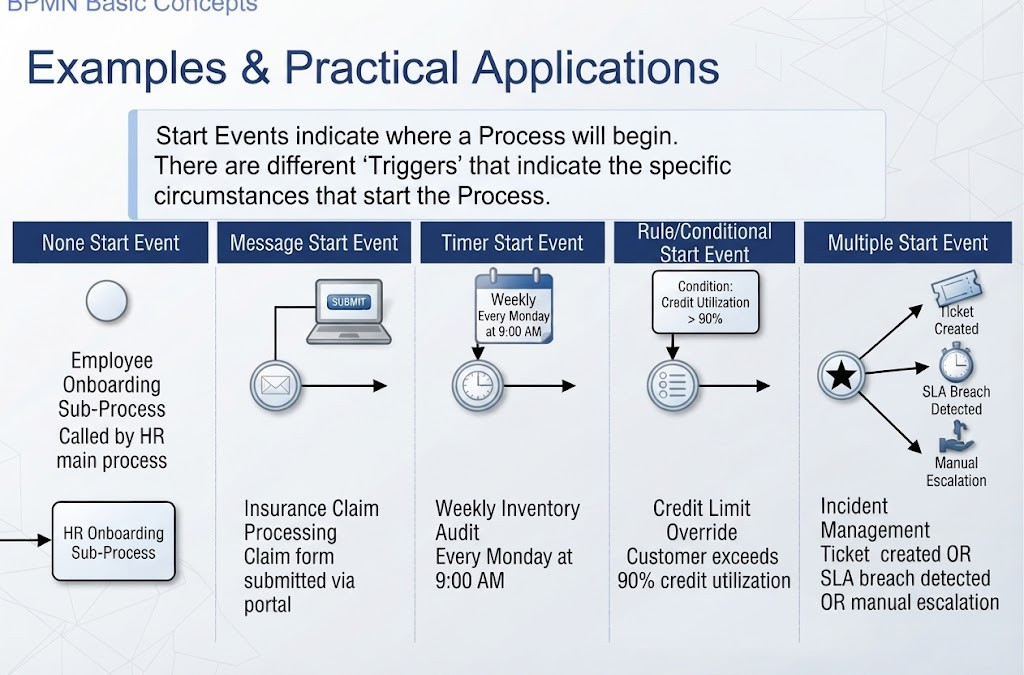
In Business Process Model and Notation (BPMN), the Start Event is the critical anchor of your process model. It defines the precise moment and condition under which a business process is initiated. Without a clearly defined start event, a process lacks a logical entry point, making it difficult to automate or manage.
This tutorial explores the five primary types of Start Events—None, Message, Timer, Rule, and Multiple—and demonstrates how to model them effectively using industry-standard tooling like Visual Paradigm.
1. The None Start Event: Sub-Process Entry
The None Start Event is the default entry point. It is visually represented by a simple circle. Unlike other start events, it does not have a specific trigger (such as a clock or a message) attached to it. Instead, it simply indicates that the process is ready to begin once control is passed to it.
Real-World Application: Employee Onboarding
This event type is strictly intended for Sub-Processes. In the context of Employee Onboarding, the main HR process might trigger a specific “Onboarding Sub-Process” for a new hire. The None Start Event acts as the entry gate for this sub-process, waiting for the parent process to hand over control.
- Scenario: Employee Onboarding Sub-Process.
- Trigger: Called by the HR main process.
- Key Characteristic: It waits passively for an external control flow to enter it.
2. The Message Start Event: External Communication
Many business processes are reactive, starting only after communication is received from the outside world. The Message Start Event (depicted by an envelope icon) signifies that the process begins upon the receipt of a specific message.
Real-World Application: Insurance Claim Processing
In an insurance environment, a claims process cannot begin until a customer takes action. The process is triggered specifically by the submission of a claim form via a customer portal.
- Scenario: Insurance Claim Processing.
- Trigger: Claim form submitted via portal.
- Key Characteristic: The system must be listening for an incoming message to activate the process instance.
3. The Timer Start Event: Scheduled Automation
Not all processes are event-driven or message-driven; some are time-driven. The Timer Start Event (depicted by a clock icon) allows a process to start automatically based on a schedule or a specific time duration. This is essential for batch processing and routine audits.
Real-World Application: Weekly Inventory Audit
Businesses often need to perform checks at fixed intervals. For example, a Weekly Inventory Audit needs to run every week to ensure stock levels are accurate. The process is hard-coded to trigger at a specific time.
- Scenario: Weekly Inventory Audit.
- Trigger: Every Monday at 9:00 AM.
- Key Characteristic: The process instance is created automatically by the engine when the clock hits the specified time.
4. The Rule Start Event: Conditional Logic
Complex business environments often require processes to start only when specific data conditions are met. The Rule Start Event (depicted by a rule icon) introduces business logic directly at the start of the process. The process will not begin until a defined condition evaluates to true.
Real-World Application: Credit Limit Override
Standard credit limits are rigid, but exceptions exist. A “Credit Limit Override” process should not run for every customer—only for those who are approaching their limits and require special attention.
- Scenario: Credit Limit Override.
- Trigger: Customer exceeds 90% credit utilization.
- Key Characteristic: The system continuously monitors data; the process fires only when the specific threshold is breached.
5. The Multiple Start Event: Complex Scenarios
In some high-volume or emergency scenarios, a process may need to handle multiple distinct triggers simultaneously or alternatively. The Multiple Start Event (depicted by a star icon) allows a single process to be initiated by more than one type of event.
Real-World Application: Incident Management
An Incident Management process is critical and must react to various sources of alerts. It needs to start if a ticket is created automatically, if an SLA breach is detected, or if a human manually escalates the issue.
- Scenario: Incident Management.
- Triggers: Ticket created OR SLA breach detected OR manual escalation.
- Key Characteristic: The process is versatile, accepting any of the defined triggers to initiate the workflow.
Tooling: Visual Paradigm
While understanding the theory is vital, implementation requires robust modeling software. Visual Paradigm is a comprehensive BPMN modeling tool that fully supports these standard start event types.
Step-by-Step Implementation
- Open Visual Paradigm: Create a new BPMN Diagram file.
- Select from Palette: Locate the Start Event in the drawing palette.
- Place and Configure: Drag the event onto the canvas. Right-click the event and select Change Event Type to switch between None, Message, Timer, Rule, or Multiple.
Best Practices for Modeling
- Label Clearly: Always add a text label describing the specific trigger (e.g., “Form Submitted” or “Every Monday”).
- Use None Events for Sub-Processes: Do not attach a timer or message to a sub-process entry point unless the sub-process itself is an event-based sub-process.
- Document Complex Triggers: For Multiple Start Events, ensure every possible trigger is documented in the event’s properties panel.
- Validate: Use the built-in BPMN Conformance Checker to ensure your diagram adheres to the specification.
Conclusion
Selecting the correct start event type is fundamental to building a process model that is both accurate and executable. Whether you are modeling a passive sub-process, a reactive message flow, or a scheduled audit, the Start Event defines the lifecycle of your business logic. By mastering these concepts and utilizing tools like Visual Paradigm, analysts can create processes that are clear, compliant, and aligned with organizational goals.
Related posts:
 Mastering BPMN 2.0: A Comprehensive Guide to Data Objects and Flows
 Mastering the To-Be Business Process: A Step-by-Step Guide to XYZ Manufacturing’s Optimized Workflow
 Mastering BPMN Start Events: A Technical Guide to Process Triggers
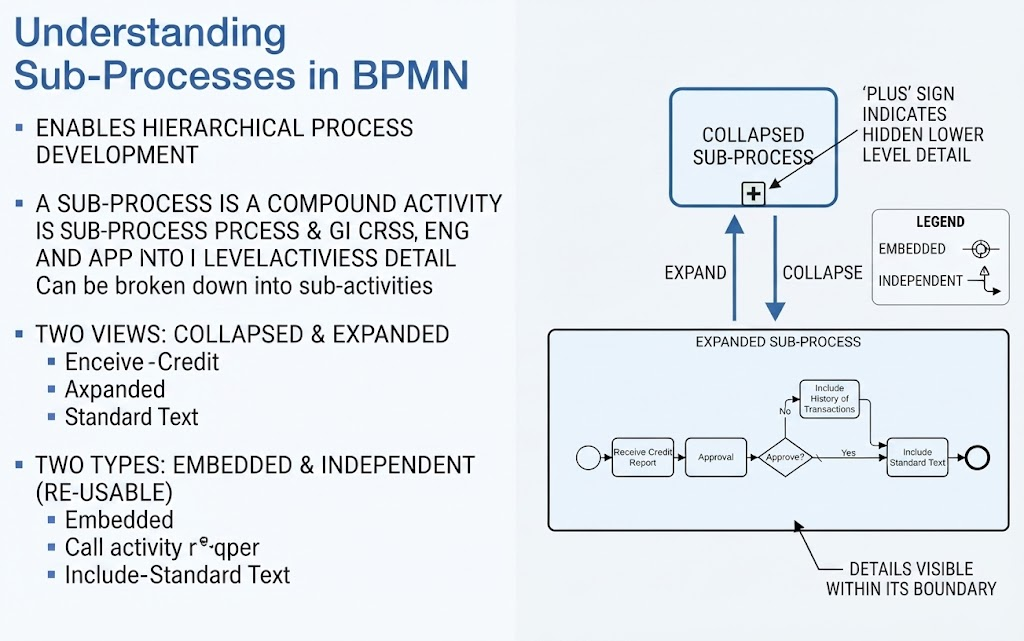 Mastering BPMN Sub-Processes: From Hierarchical Logic to Visual Modeling