Object-Oriented Programming (OOP) serves as the backbone of modern software development. However, for many beginners—and even seasoned developers—the distinction between a Class and an Object can remain abstract. To truly grasp these concepts, it is essential to visualize how code translates into real-world structures.
This tutorial breaks down these fundamental concepts using a relatable example: a Smart Home system. We will explore how to define the structure of a device using UML Class Diagrams and how to visualize specific instances of that device using Object Diagrams. To illustrate these concepts, we will analyze a system modeled using Visual Paradigm.
Part 1: The Class – The Architectural Blueprint
In the world of OOP, a Class is essentially a template or a blueprint. It defines the properties and behaviors that all objects of a certain type will share, but it does not exist physically in the same way a tangible object does.
Analyzing the Smart Home Device Class
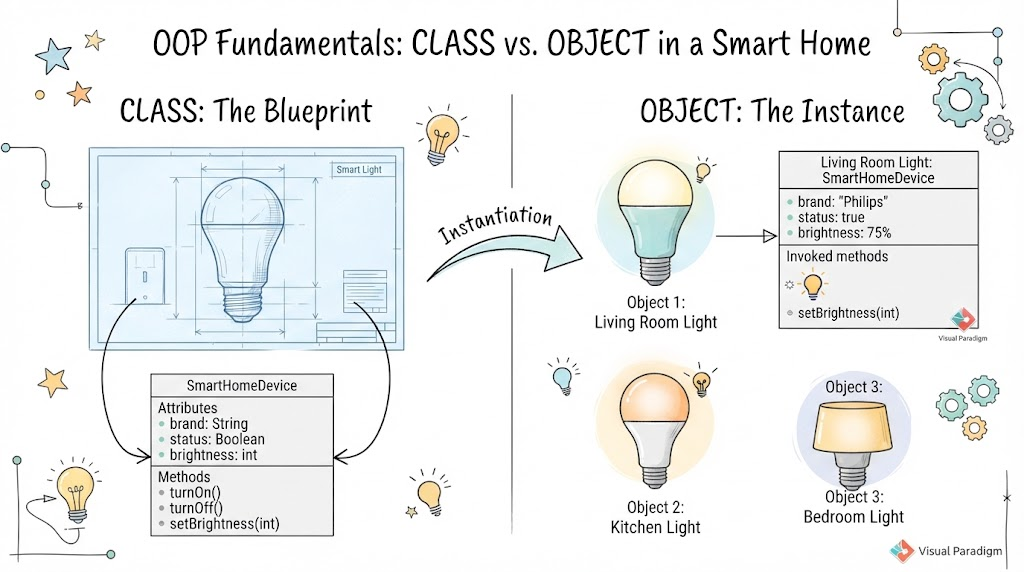
In our diagram, we see a box labeled SmartHomeDevice. This represents the Class definition. Just as an architect draws a blueprint that specifies where the electrical outlets go and the dimensions of the room, a Class diagram specifies the internal structure of a software component.
The Class diagram is divided into two main sections:
- Attributes (Data): These are the variables that describe the state of the object. In our
SmartHomeDeviceclass, we define: brand: String(e.g., “Philips”)status: Boolean(e.g., true/false)brightness: int(e.g., 0-100)- Methods (Behaviors): These are the functions the object can perform. They represent the “verbs” of our object. The
SmartHomeDeviceclass defines: turnOn()turnOff()setBrightness(int)
Think of this Class diagram as a generic “Light Bulb” design. It tells us what a light bulb is and what it can do, but it is not a light bulb you can screw into a socket yet.
Part 2: The Object – The Real-World Instance
Once the blueprint (Class) is finalized, we can begin construction. In programming, this process is called Instantiation. An Object is a specific instance of a Class. It is the actual entity created from the blueprint, holding its own unique data values.
Visualizing the Instances
In the diagram, the arrow labeled “Instantiation” points from the Class to the Objects. We see three distinct lights:
- Object 1: Living Room Light
- Object 2: Kitchen Light
- Object 3: Bedroom Light
Even though all three objects are instances of the SmartHomeDevice class, they are unique. They might all share the same methods (they can all turn on and off), but their attributes (their specific state) are different.
Detailed Breakdown of Object 1: Living Room Light
Let’s examine the details provided for the Living Room Light in the diagram to see how an Object differs from its Class.
While the Class says brightness: int, the Object holds a specific value: brightness: 75%. While the Class says brand: String, the Object holds the specific string: "Philips". The status is currently true, indicating this specific bulb is on.
Furthermore, the object diagram highlights Invoked methods. The diagram shows a light bulb icon with a lightning bolt, indicating that the method setBrightness(int) was called on this specific object to reach its current state.
Part 3: Why This Distinction Matters
Understanding the separation between Class and Object is critical for effective system architecture. If you were building a Smart Home app without this separation, you might write code that hardcodes the Living Room light, the Kitchen light, and the Bedroom light as entirely different, unrelated scripts.
By using a Class-based approach:
- Reusability: You define the logic once in the
SmartHomeDeviceclass. You can create thousands of new lights (Objects) without rewriting the code forturnOn()orturnOff(). - Maintainability: If you need to change how brightness is calculated, you update the Class. All existing Objects automatically reflect this update.
- Clarity: Visual tools like the Object Diagram allow developers to see the state of the system at a specific moment in time, which is invaluable for debugging.
Conclusion
By visualizing the SmartHomeDevice as a blueprint and the Living Room Light as a physical instance, the abstract concepts of OOP become clear. The Class defines the structure and behavior, while the Object represents the data and state of a specific entity within the system. Tools like Visual Paradigm help bridge the gap between these theoretical designs and the practical implementation of software.