


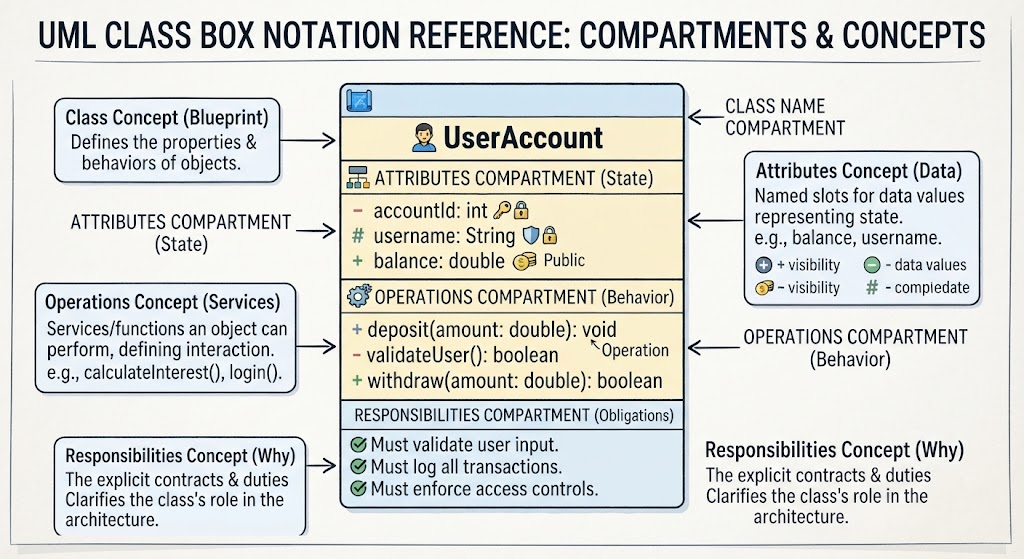
In the world of software engineering and system design, the ability to communicate complex ideas clearly is just as vital as the code itself. The Unified Modeling Language (UML) serves as the universal grammar for this communication, allowing developers, architects, and stakeholders to visualize system architecture before a single line of code is written. Among the most critical tools in this toolkit is the UML Class Diagram, specifically the notation used to represent a single class.
This tutorial provides a deep dive into the anatomy of a UML Class Box. By understanding the distinct compartments that make up these boxes, you will learn how to model not just the code structure, but the semantic meaning behind your software’s design.
Core Concepts: The Building Blocks
Before we dissect the visual notation, it is essential to grasp the fundamental terminology that defines a class. A class in UML is more than just a syntax rule; it is a blueprint.
- Class: A blueprint or template for creating objects. It defines the properties (attributes) and behaviors (operations) that objects will possess. In object-oriented programming, the class is the foundational unit of abstraction.
- Compartment: A distinct, horizontally divided section within the UML class rectangle. These compartments separate different types of information, such as data, behavior, and purpose.
- Attributes: The named slots for data values. They represent the state or properties of the class (e.g.,
balance,username). Attributes define what data an object holds in memory. - Operations: The services or functions that an object can perform. They represent the behavior or actions the class can execute (e.g.,
calculateInterest(),login()). - Responsibilities: The explicit obligations, contracts, or duties that a class has toward the system. Responsibilities clarify the “why” behind a class’s existence (e.g., “Must validate user input”).
The Anatomy of the Standard UML Class Box
By default, the standard UML notation for a class is represented as a single rectangle divided into three distinct compartments, stacked vertically. However, to fully capture architectural intent, a fourth compartment is often utilized. Let us explore each section in detail.
1. Top Compartment: The Class Name
The top section is the header of your class. Its primary purpose is to instantly tell the reader what entity is being modeled.
- Content: Contains the name of the class.
- Formatting Rule: The class name must always be written in boldface type to make it stand out. If the class is abstract, the name is typically italicized.
- Best Practice: The name should be a noun or noun phrase that clearly describes the entity’s role (e.g.,
UserAccount,BankAccount).
2. The Middle Compartment: Attributes (State)
Directly below the name lies the compartment that defines the data structure and state. These are the named slots for data values that the object will hold in memory.
When modeling attributes, specific formatting rules apply to ensure clarity:
- Visibility Modifiers: Attributes are prefixed with symbols indicating their access level:
+for Public (accessible from anywhere).-for Private (accessible only within the class).#for Protected (accessible within the class and its subclasses).~for Package (accessible within the same package).
- Type Specification: Each attribute includes its name, followed by a colon and its data type (e.g.,
accountNumber : String). - Default Values: You may specify default values after an equals sign (e.g.,
status : OrderStatus = PENDING).
3. Bottom Compartment: Operations (Behavior)
The compartment below the attributes defines the behavior of the class. These are the services that an object can request or execute to affect its behavior or interact with other classes.
Like attributes, operations follow strict notation details:
- Visibility Modifiers: Use the same prefixes as attributes (+, -, #, ~).
- Signature: An operation signature includes the name, parameter list (with types), and return type (e.g.,
+ deposit(amount : Double) : void). - Abstract Operations: If an operation is abstract (meaning it has no implementation in this class), it is typically italicized.
Advanced Modeling: The Responsibilities Compartment
While the standard notation consists of three sections, the diagram illustrates a fourth, often overlooked compartment: Responsibilities. This section is crucial for high-level architectural design.
What goes here? This section lists the explicit obligations, contracts, or duties that the class must fulfill. It clarifies the “why” behind the class’s existence and its role within the broader architecture.
Example: Instead of just listing methods, you might write:
- Must validate user input.
- Must log all transactions.
- Must enforce access controls.
Conclusion
Understanding these concepts ensures that your diagrams are not just visually correct but also semantically meaningful. By mastering the UML Class Box notation, you enable effective communication among developers, architects, and product managers, ensuring that the system architecture is built on a foundation of clear understanding.
Related posts:
 Mastering the 14 UML Diagram Types: A Comprehensive Tutorial for Software Architects
 Is UML Dead? How Diagram-as-Code and AI Revived It for Agile Teams in 2026
 Introduction to Conversational Modeling with VP AI Chatbot
 Mastering the UML Class Box: A Comprehensive Guide to Software Architecture and Modeling