Understanding the Big Picture
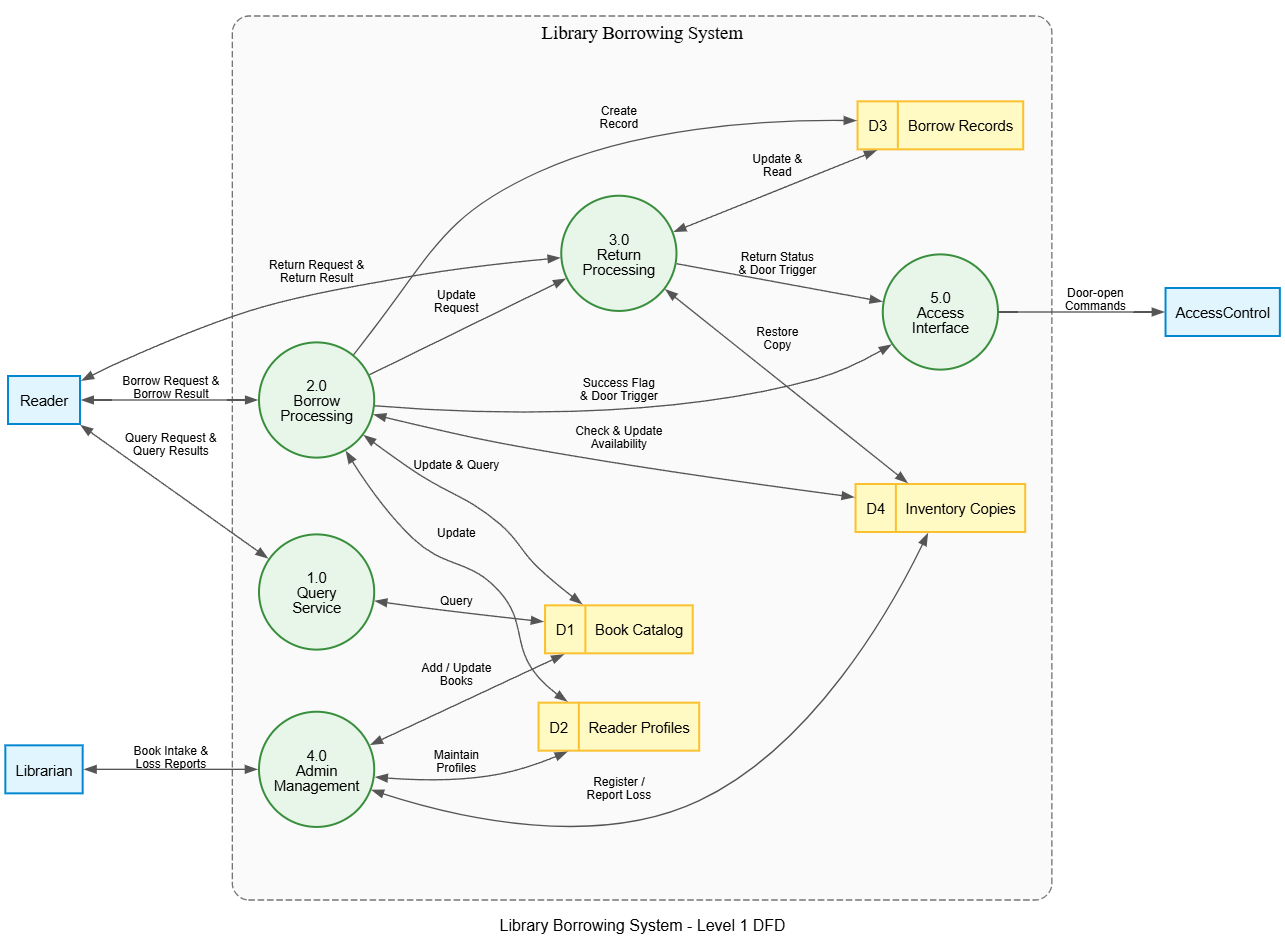
Welcome to this tutorial. Today, we are going to dissect a classic example of system analysis: the Library Borrowing System. Specifically, we will be looking at its Level 1 Data Flow Diagram (DFD).
If you have ever wondered how a library keeps track of thousands of books and members without losing count, it’s all about data flow. A Level 1 DFD is like a blueprint that breaks down a complex system into manageable sub-processes. It answers the question: “How does data move through the system?”
The Boundaries of Our System
First, let’s look at the container in our diagram—the dashed box labeled Library Borrowing System. This represents the boundary. Everything inside this box is part of our software or system logic. Anything outside is an external entity or another system that interacts with ours.
Identifying the Actors (External Entities)
Every system has users or external systems that talk to it. In Visual Paradigm, these are often represented by rectangles on the edge of the diagram. Let’s identify who is talking to our library:
- The Reader: Located on the left, this entity initiates requests. They want to borrow books, return them, or simply check if a book exists.
- The Librarian: Also on the left, but lower down. This is the administrator. They manage the inventory and handle reader profiles.
- Access Control: Found on the far right. This isn’t a person; it’s a security system. It ensures that only authorized people can enter the building based on the library’s data.
Diving into the Processes
The heart of a DFD lies in the circles (or rounded rectangles). These represent Processes—actions that transform input data into output data. Notice how they are numbered? This hierarchy helps us organize complexity.
1.0 Query Service
This is the simplest interaction. When a Reader wants to find a book, they send a “Query Request.” The Query Service process goes to the data store to check for the book and sends back “Query Results.”
2.0 Borrow Processing
This is where the magic happens. When a Reader decides to take a book home:
- The system checks the Book Catalog (Data Store D1) to see if the book exists.
- It verifies the copy availability against Inventory Copies (Data Store D4).
- Once successful, it creates a new record in Borrow Records (Data Store D3).
- Crucially, it sends a signal to the Access Interface to trigger the door open mechanism.
3.0 Return Processing
What happens when a book comes back? The Return Processing cycle mirrors borrowing but in reverse. It updates the inventory to make the book available again and records the transaction history. It also communicates with the Access Control system to ensure the door triggers correctly upon exit.
4.0 Admin Management
The Librarian doesn’t just watch; they maintain the system. Through the Admin Management process, they add new books to the catalog, update reader profiles, and report lost items. This ensures the data remains accurate over time.
The Memory of the System (Data Stores)
In a DFD, data doesn’t just disappear; it gets stored. We represent these storage points as open-ended rectangles or boxes. In our library system, we have four key repositories:
- D1 Book Catalog: The master list of all titles.
- D2 Reader Profiles: Who is allowed to borrow?
- D3 Borrow Records: History of who borrowed what and when.
- D4 Inventory Copies: How many physical copies exist and their status.
Connecting to the Outside World
We cannot forget the 5.0 Access Interface. This acts as a bridge between our internal logic and the physical world. When a transaction succeeds (either borrowing or returning), the system sends a “Door Trigger” command to the Access Control system. Without this connection, the library would be a digital ghost town!
Key Takeaways
To wrap up this session, here is what you should remember about the Level 1 DFD for a Library Borrowing System:
- Flow is Key: Understand that data flows from entities, through processes, into storage, and back out again.
- Numbering Matters: The numbering (1.0, 2.0, etc.) indicates distinct functional areas within the system.
- External Dependencies: Real-world systems rarely work in isolation; notice how the Access Control system relies on our library’s decisions.
By visualizing these interactions, tools like Visual Paradigm help developers and analysts ensure that no data path is missed before writing a single line of code.