In the world of Business Process Model and Notation (BPMN), the difference between a sluggish, inefficient system and a responsive, scalable one often comes down to a single modeling choice: How you represent “waiting.”
For Agile development teams and technical architects, confusing a Task with an Event is a common pitfall that can lead to significant technical debt. This tutorial breaks down the critical distinction between generic tasks and proper event triggers, explaining how to model event-driven architectures correctly using Visual Paradigm.
The Common Mistake: Using Tasks for Waiting
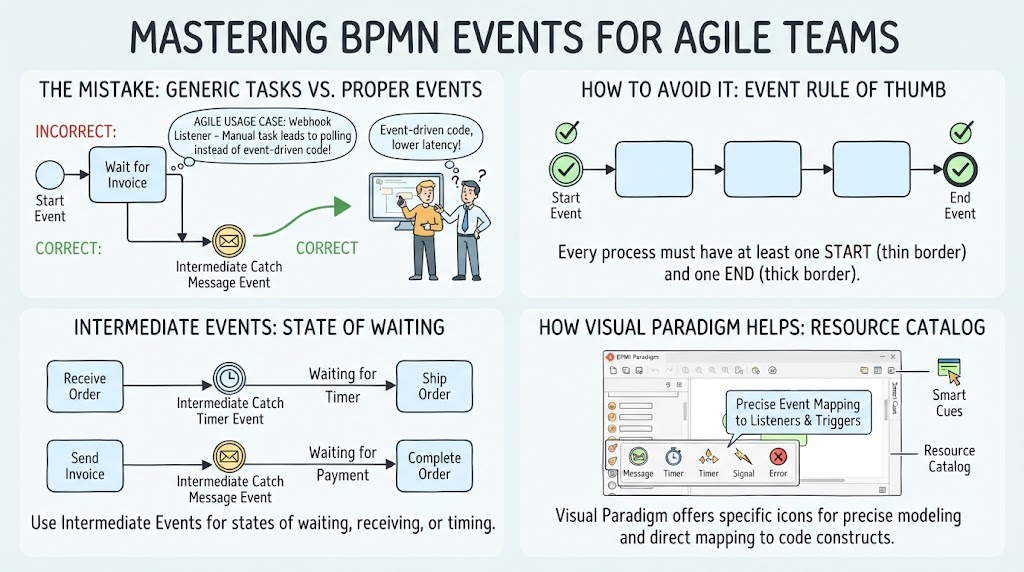
When modeling a process, it is tempting to use a standard Task (a rectangle) to represent any period of time where the system is “doing nothing” or “waiting.” Consider a scenario where a system needs to wait for an external signal, such as an API webhook or an invoice.
The Polling Trap
If you model this wait as a generic task, such as a manual task named “Wait for Webhook”, you create a specific problem for the developers implementing the code. The visual cue of a box implies that the system should actively check, or poll, a database or API endpoint repeatedly to see if the data has arrived.
- The Result: Developers build polling mechanisms. This results in higher server load, increased latency, and inefficient resource usage.
- The Cost: Your system wastes CPU cycles asking questions that haven’t happened yet.
The Correct Approach: Event-Driven Modeling
To avoid the polling trap, you must use Intermediate Catch Message Events. In BPMN, an Event is a circle, and it signifies a point of activity or a state of waiting. By changing your diagram from a Task to an Event, you are signaling a fundamental shift in the underlying logic.
From Active to Passive
When you model a wait as an Intermediate Catch Message Event, the architecture changes from “asking” to “listening.”
- The Correct Model: Instead of a box, you place a circle with an envelope icon (representing a message) on the process path.
- The Implementation: This allows developers to build an event-driven listener. The server sits idle until the specific message (e.g., the webhook) arrives, triggering the next step instantly.
- The Benefit: This results in lower latency and a more efficient system that only consumes resources when actual work needs to be done.
Intermediate Events: The States of Waiting
BPMN provides several types of Intermediate Events to handle different states of waiting. These are not just visual decorations; they map to specific code constructs.
- Intermediate Catch Timer Event: Used when a process must wait for a specific duration. For example, a process might “Receive Order,” wait for a “Timer Event” (e.g., 24 hours), and then “Ship Order.” This maps to a scheduled job or a delay mechanism in code.
- Intermediate Catch Message Event: Used for asynchronous communication. For instance, after “Send Invoice,” the system waits for a “Message Event” representing “Payment.” This maps to a callback or a message queue listener.
Ensuring Structural Integrity: Start and End Events
Just as a process needs a correct way to handle the middle, it must also define its boundaries. A robust BPMN model requires strict adherence to start and end event rules to prevent “dead” processes.
The Event Rule of Thumb
Every process diagram must have:
- At least one Start Event: Represented by a circle with a thin border. This is the trigger that initiates the process.
- At least one End Event: Represented by a circle with a thick border. This signifies the successful completion or termination of the process.
Without these anchors, the process flow is undefined, and automated execution engines may fail to launch the workflow correctly.
How Visual Paradigm Helps: The Resource Catalog
Modeling tools like Visual Paradigm play a crucial role in enforcing these best practices. By providing a dedicated Resource Catalog with distinct event icons (Message, Timer, Signal, Error), the tool encourages precise modeling.
These “Smart Cues” ensure that when you are designing the logic, you are forced to choose the specific type of event that matches your technical requirement. This visual precision makes it easier for technical teams to map the BPMN diagram directly to code constructs like listeners, triggers, and handlers, bridging the gap between business design and software engineering.