


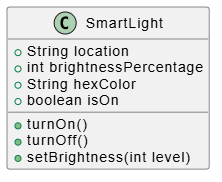
In the world of software engineering, we often face the challenge of managing complexity. How do we organize code so that it is scalable, maintainable, and easy to understand? The answer lies in Object-Oriented Programming (OOP) and the fundamental concept of the Class. This tutorial explores the architecture of a “Smart Light” system, breaking down how a single Class Diagram acts as the blueprint for an entire ecosystem of devices.
The Blueprint vs. The Instance
To understand system architecture, you must first grasp the distinction between a Class and an Instance (or Object). This is often described using the analogy of an architectural blueprint versus the actual building.
- The Class (The Blueprint): A class is a template or a recipe. It defines the structure of data and the behaviors available, but it does not hold the actual data itself. Think of it as the definition of “What a Smart Light is.”
- The Instance (The Object): An instance is a specific realization of that class. If the Class is the blueprint, the Object is the physical light bulb installed in your ceiling. The Class says, “A light has a brightness level,” while the Instance says, “This specific light is at 50% brightness right now.”
Architecting the SmartLight System
Let us apply these concepts to a real-world scenario: a Smart Home. We are designing a SmartLight class. Every light in the house, whether it is a lamp in the bedroom or a fixture in the hallway, follows this definition.
The system architecture relies on two primary pillars found within the class structure:
1. Attributes (State and Data)
Attributes define the “State” of the object. They are the variables that store information about the light. In our SmartLight blueprint, we define four critical attributes:
String location: This stores the physical placement of the light (e.g., “Kitchen” or “Living Room”).int brightnessPercentage: An integer to store the intensity level, ranging from 0 to 100.String hexColor: A string representation of the color (e.g., “#FF0000” for red), allowing for color-changing smart bulbs.boolean isOn: A binary flag that tracks the current power state (true/false).
2. Methods (Behavior and Actions)
Methods define the “Behavior” of the object. These are the functions that the object can perform. They are the verbs that describe what the light can do. The SmartLight class exposes three key methods:
turnOn(): Changes the state to active and sets the color.turnOff(): Changes the state to inactive.setBrightness(int level): Allows external systems to adjust the light intensity dynamically.
Visualizing the Architecture
How do we represent this structure visually? In professional software development, we use Class Diagrams. These diagrams allow developers to see the structure of the system without getting bogged down in the implementation details.
Using a tool like PlantUML (often integrated into environments like VPasCode), we can generate a visual representation of the SmartLight class. This diagram serves as the contract for the software: it tells the programmer exactly what data to expect and what functions are available.
Source Code Representation
Below is the PlantUML code that generates the visual model. This code defines the class structure, specifying data types (like int or String) and visibility (public attributes).
@startuml class SmartLight { + String location + int brightnessPercentage + String hexColor + boolean isOn + turnOn() + turnOff() + setBrightness(int level) } @enduml
Why This Matters
By strictly defining the SmartLight class, we ensure consistency across the entire application. Whether you create 10 lights or 10,000, they all share the same blueprint. This modular approach makes the system scalable. If you need to add a new feature, such as “timer settings,” you simply update the blueprint (the Class), and every subsequent instance of the light automatically gains that capability.
Understanding this separation between the definition (Class) and the reality (Instance) is the cornerstone of building robust, object-oriented systems.
Related posts:
 Mastering the 14 UML Diagram Types: A Comprehensive Tutorial for Software Architects
 Is UML Dead? How Diagram-as-Code and AI Revived It for Agile Teams in 2026
 Introduction to Conversational Modeling with VP AI Chatbot
 Mastering the UML Class Box: A Comprehensive Guide to Software Architecture and Modeling