


Enterprise Architecture (EA) frameworks like TOGAF 10 provide the essential structure for organizing complex IT landscapes. However, a common pitfall for practitioners is treating these frameworks as purely theoretical documents. The true power of TOGAF lies in its application. This tutorial explores how to translate the abstract concepts of the TOGAF Standard into actionable engineering practices using Visual Paradigm (VP).
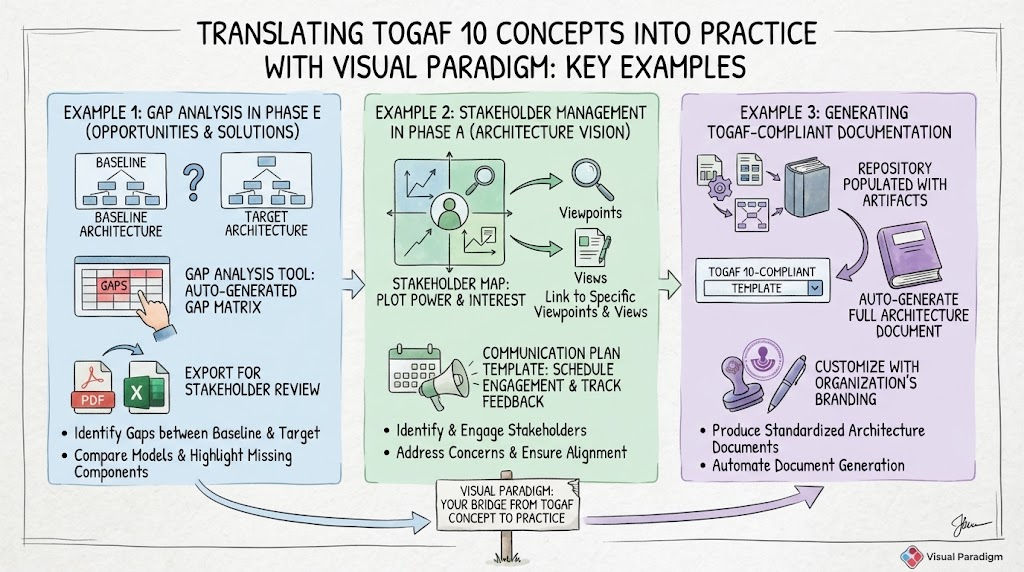
We will walk through three critical pillars of the TOGAF Architecture Development Method (ADM) as illustrated in our visual guide: conducting Gap Analysis in Phase E, managing Stakeholders in Phase A, and automating Documentation.
1. Bridging Theory and Practice: The Role of Tooling
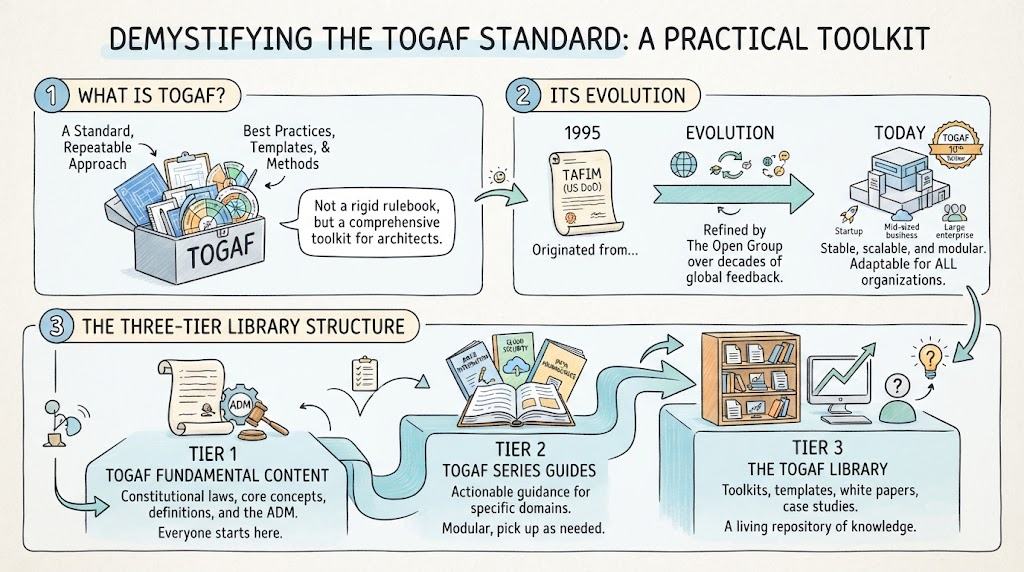
TOGAF 10 has evolved into a modular standard, offering flexibility through its “Fundamental Content” and “Series Guides.” Yet, managing this modularity requires robust tooling. Visual Paradigm acts as the bridge, converting static concepts into dynamic models. By integrating directly with the TOGAF content metamodel, VP ensures that every artifact you create adheres to the standard’s governance requirements.
The following sections detail how to leverage VP to execute three specific, high-impact TOGAF activities.
2. Example 1: Gap Analysis in Phase E (Opportunities & Solutions)
Phase E of the ADM is dedicated to identifying opportunities and solutions. The core objective here is to determine the changes required to move your organization from its current state to its desired future state.
The Concept: Identifying the Delta
In TOGAF, a Gap Analysis is the process of comparing the Baseline Architecture (what you have) with the Target Architecture (what you want). This comparison reveals “gaps”—missing components, obsolete relationships, or new requirements that must be addressed.
The Visual Paradigm Workflow
Visual Paradigm transforms this manual comparison into an automated engineering process:
- Modeling the Baseline and Target: First, create two distinct architecture diagrams within VP. One represents the current state (Baseline), and the other represents the future state (Target).
- Running the Gap Analysis Tool: Instead of manually comparing lists, utilize the dedicated Gap Analysis Tool in VP. You simply select your two models as inputs.
- Generating the Gap Matrix: VP automatically performs a semantic comparison. It generates a Gap Matrix that visually highlights:
- Missing Components: Elements present in the Target but absent in the Baseline.
- Changed Relationships: Shifts in how entities interact between the two states.
- New Requirements: Gaps that imply new functional needs.
- Export for Review: Once the analysis is complete, export the resulting matrix as a PDF or Excel file. This provides a clear, actionable report for stakeholder review.
3. Example 2: Stakeholder Management in Phase A (Architecture Vision)
Phase A sets the stage for the entire project. Before drawing technical diagrams, you must understand who cares about the architecture and what they need to see.
The Concept: Addressing Concerns
TOGAF emphasizes that different stakeholders have different concerns. A CEO cares about strategic alignment, while a System Administrator cares about security protocols. The goal is to identify these stakeholders and ensure their specific concerns are addressed through tailored views.
The Visual Paradigm Workflow
Visual Paradigm streamlines this engagement process through visualization and planning:
- Creating a Stakeholder Map: Use VP to create a diagram that plots stakeholders based on their Power and Interest. This helps you prioritize your engagement efforts.
- Linking to Viewpoints and Views: In the VP repository, link each stakeholder to specific Viewpoints (the lens through which they view the system) and Views (the actual diagrams they will see). This ensures that no stakeholder is left without a relevant perspective.
- Communication Planning: Do not leave engagement to chance. Use the Communication Plan template in VP to:
- Schedule specific engagements.
- Track feedback from stakeholders.
- Ensure that concerns are formally recorded and addressed.
4. Example 3: Generating TOGAF-Compliant Documentation
One of the most tedious aspects of Enterprise Architecture is documentation. The TOGAF standard requires extensive reporting to support governance and communication. However, manual documentation is error-prone and hard to maintain.
The Concept: Automated Artifact Generation
The goal is to produce standardized architecture documents that are consistent, accurate, and compliant with the standard. The documentation should be a byproduct of the modeling work, not a separate task.
The Visual Paradigm Workflow
Visual Paradigm’s Document Engine automates this critical step:
- Populate the Repository: As you complete your ADM phases, ensure all artifacts (diagrams, catalogs, matrices) are saved in the VP repository.
- Select a Template: Open the Document Engine and select a TOGAF 10-compliant template. These templates are pre-configured to meet the structural requirements of the standard.
- Auto-Generate: Trigger the generation process. VP will scan your repository and automatically assemble a full architecture document, embedding your diagrams, catalogs, and matrices directly into the text.
- Customize: Finalize the output by adding your organization’s branding and any necessary commentary. The result is a professional, governance-ready document.
Conclusion: From Concept to Value
TOGAF 10 offers a mature, flexible framework for Enterprise Architecture, but its success depends on execution. By utilizing tools like Visual Paradigm, practitioners can move beyond theory. Whether you are performing a rigorous Gap Analysis in Phase E, mapping stakeholder concerns in Phase A, or automating documentation, VP provides the necessary infrastructure to make EA practical, sustainable, and value-driven.
Start small, focus on value, and iterate—just as the ADM intends.
Related posts:
 Demystifying the TOGAF Standard: A Practical Toolkit for Modern Enterprise Architecture
 Mastering TOGAF: A Step-by-Step Guide to the ADM Cycle and Enterprise Architecture
 Mastering Enterprise Architecture: A Step-by-Step Guide to the Four Core Purposes
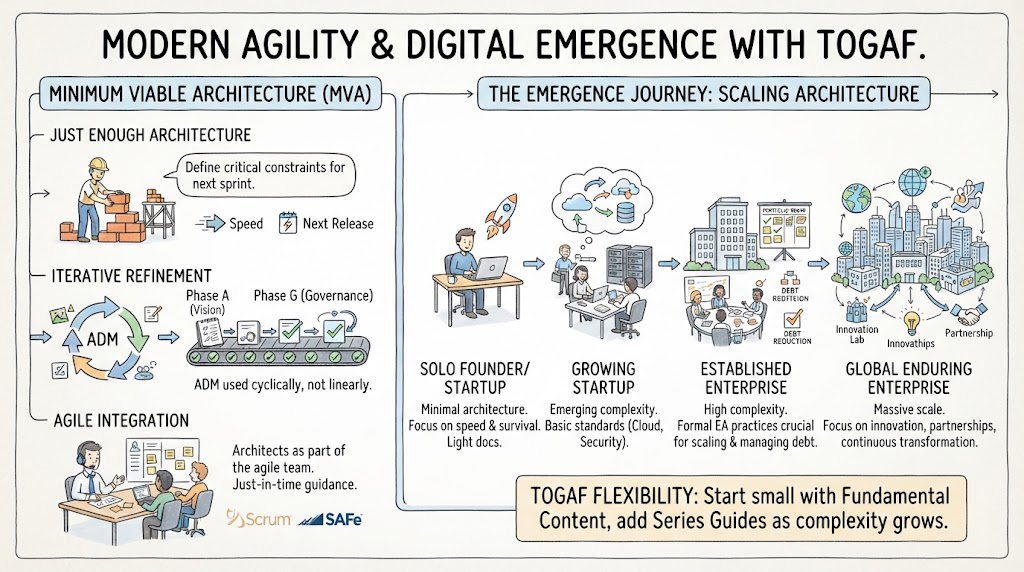 Mastering Modern Agility: A Tutorial on Minimum Viable Architecture and the Digital Emergence Journey