In the complex world of Business Process Model and Notation (BPMN), understanding the flow of time and external stimuli is crucial. This guide dives deep into one of the most versatile elements of process modeling: the Intermediate Event. Whether you are using Visual Paradigm or another BPMN tool, mastering these events allows you to create dynamic, realistic models that reflect real-world business scenarios.
What Are Intermediate Events?
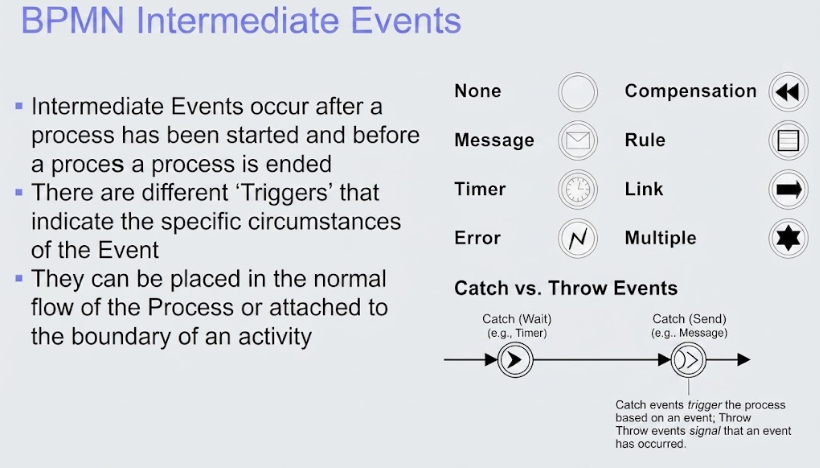
Intermediate Events act as the “heartbeat” of a business process. Unlike Start or End events which mark the absolute beginning and conclusion, an Intermediate Event occurs somewhere in the middle of the flow. It happens after a process has started but before it is officially terminated.
Think of them as the checkpoints, pauses, or alerts that dictate how a process evolves. They represent a specific point in the flow where something happens that affects the continuation of the workflow.
Key Characteristics
- Placement: They can be placed directly in the normal sequence flow (acting as a Catching or Throwing event) or attached to the boundary of an activity (acting as a Boundary Event).
- Triggers (Icons): Each event type is distinguished by a specific icon inside a double-bordered circle. This icon indicates why the event fires, such as waiting for a message, a timer expiring, or an error occurring.
The Mechanics: Catching vs. Throwing
One of the most common points of confusion in BPMN is the direction of the event. It is essential to understand that an Intermediate Event can function in two distinct ways: as a Catcher or a Thrower.
1. Catching Events (The Wait)
A catching event acts as a pause. The process flow enters this event and waits for a specific condition to occur before it can continue along the outgoing sequence flow.
- Behavior: The process execution is suspended at this point.
- Example: Waiting for a customer approval email before proceeding to ship goods.
- Visual Cue: Often depicted with a thin outline or a “clock” icon, signaling a passive waiting state.
2. Throwing Events (The Signal)
A throwing event acts as an active signal. When the process flow reaches this event, it actively triggers or sends something (like a notification or an error) and immediately continues without delay.
- Behavior: The process does not pause; it executes an action and moves on instantly.
- Example: Sending a notification to a manager or raising an error code when a validation fails.
- Visual Cue: Often depicted with a thick outline, signaling an active trigger.
The Eight Intermediate Event Types
BPMN defines eight standard types of Intermediate Events. Each serves a unique purpose in modeling complex logic. Below is a comprehensive breakdown of these types and their practical applications.
1. None Event
This is a generic placeholder with no specific trigger icon. It is often used for simple linking or when the specific nature of the event is irrelevant to the current model level. It helps break up long sequence flows visually.
2. Message Event
This is one of the most common events. It is used to represent communication between participants (Pools/Lanes) or systems.
- Use Case: Receiving an API call, catching an email from a client, or throwing a notification message.
3. Timer Event
Time-based events are critical for processes that must wait for a specific duration or a specific point in time.
- Use Case: Waiting 5 minutes for a response, triggering a report at 5:00 PM, or a recurring daily cycle.
4. Error Event
These events handle exceptions and abnormal conditions. They are typically used to catch errors generated by activities (Error Boundary Events) or to signal an error to a higher level (Error End Events).
- Use Case: Catching a “Database Connection Failed” error and routing the flow to a retry logic.
5. Compensation Event
Compensation is used in long-running processes to “undo” or rollback logic. If a specific step in a process fails later on, a compensation event can trigger a “clean-up” activity to reverse previous actions.
- Use Case: If a hotel booking fails, trigger a compensation to cancel the user’s pending reservation.
6. Rule Event
This event evaluates a business rule. It allows the process to proceed based on the outcome of a decision logic without hard-coding the decision in the activity itself.
- Use Case: Checking if a user is over 18 before proceeding to a purchase page.
7. Link Event
Links are used to connect two points in the same process level without drawing a long, messy sequence flow line. They improve diagram readability by allowing you to “jump” to a different section of the page.
- Use Case: Connecting a “Start” event to a complex sub-process located on another page of the diagram.
8. Multiple Event
A Multiple event represents a scenario where the event can be triggered by multiple different types of triggers. The event fires when any (or all, depending on configuration) of the specified triggers occur.
- Use Case: A process waiting for either a “Payment” OR a “Cancellation Request”.
Conclusion
By integrating these Intermediate Events into your Visual Paradigm models, you move beyond simple linear diagrams to dynamic representations of reality. Whether you are modeling a simple approval workflow or a complex, multi-system integration, understanding the nuance between Catching and Throwing events—and knowing which of the eight types to apply—is the key to professional BPMN mastery.