In the realm of Business Process Model and Notation (BPMN), robustness is just as important as efficiency. A process model isn’t just about showing how things go right; it’s about defining how a system behaves when things go wrong. This tutorial explores Intermediate Error Events, a critical mechanism for handling exceptions like payment gateway failures, ensuring your applications fail gracefully rather than crashing silently.
The Architecture of Resilience
When designing a system like an e-commerce checkout, we often focus on the “Happy Path”—the sequence of events where everything works perfectly. However, production environments are unpredictable. A database might time out, a network might drop, or an external API (like a payment processor) might reject a transaction.
The diagram we are analyzing demonstrates a specific pattern for handling these disruptions using a Throw Event and a Catch Event. This pattern allows the process to detect an error, pause the standard flow, and divert to a specific recovery or notification task.
Visualizing the Flow
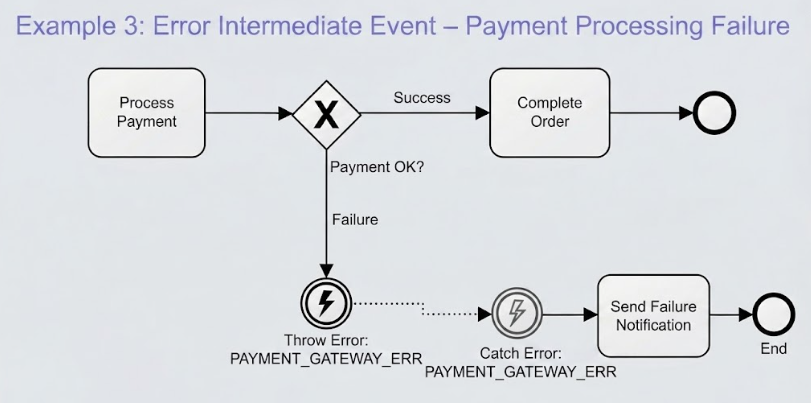
Let’s break down the diagram shown in the example. It depicts a payment scenario split into two distinct branches based on the outcome of a decision.
- The Decision Point: The diamond shape marked with an ‘X’ is an Exclusive Gateway. It acts as a fork in the road, asking the question: “Payment OK?”
- The Success Path: If the answer is yes, the flow moves to Complete Order. This represents the standard happy path.
- The Failure Path: If the answer is no, the flow travels downward. This is where the error handling logic resides.
Deep Dive: The Intermediate Throw Event
On the failure branch, you will notice a circle containing a lightning bolt symbol. In BPMN terminology, this is an Intermediate Throw Event.
This event serves a specific architectural purpose: it is the trigger that signals “Something went wrong.” Unlike a standard task, this event doesn’t do work; it produces an error signal. In our specific example:
- Location: It is placed immediately after the “Process Payment” task (implied) or the decision gate.
- Event Type: The lightning bolt indicates an Error event.
- The Error Code: The label
PAYMENTGATEWAYERRis crucial. It acts as a unique identifier. It tells the system, “The specific error thrown here is a Payment Gateway Error.”
Deep Dive: The Intermediate Catch Event
Directly following the throw event is another circle with a lightning bolt. This is the Intermediate Catch Event.
This event is the receiver of the error signal. It is “catching” the error thrown upstream. The dotted line connecting the Throw and Catch events represents the error propagation mechanism. It signifies that the error has been thrown into the process engine and is now being intercepted by this specific handler.
For the Catch Event to function correctly, it must match the thrown error. In this architecture, both events reference the exact same code: PAYMENTGATEWAYERR. This ensures that if a generic “System Error” were thrown elsewhere, it would not be caught by this specific handler.
Implementation Steps in Visual Paradigm
How do you translate this diagram into a working model in Visual Paradigm? Follow these technical steps to replicate this architecture:
Step 1: Setup the Decision Logic
Begin by modeling the “Process Payment” task. Connect it to an Exclusive Gateway (the diamond with the ‘X’). Ensure you create two outgoing sequence flows:
- Label one Success and connect it to the “Complete Order” task.
- Label the other Failure. This is your error handling branch.
Step 2: Configure the Throw Event
On the Failure branch, place an Intermediate Event. Change its type to Error (look for the lightning bolt icon).
Crucial Configuration: Open the properties of this event and define the Error Code. Enter PAYMENTGATEWAYERR. This is the “name” of the error.
Step 3: Configure the Catch Event
Place another Intermediate Event downstream. Set its type to Error.
Crucial Configuration: In the error code specification, you must select or type the exact same code: PAYMENTGATEWAYERR.
Note: In BPMN, an Error Catch Event can only catch errors thrown by the same process or a defined boundary error. In this inline pattern, they are linked by the flow.
Step 4: Connect the Recovery Task
Finally, connect the Catch Event to the task that resolves the issue. In this scenario, the task is Send Failure Notification. This ensures the customer is informed of the specific failure, allowing them to retry or contact support.
Why This Matters
By utilizing Intermediate Error Events, you move from a brittle process to a resilient one. You are explicitly defining the contract for failure. Instead of the system stopping and showing a generic “System Error” page to the user, the process logic diverts to a specific notification task. This level of detail is essential for building enterprise-grade applications where user experience and error transparency are paramount.