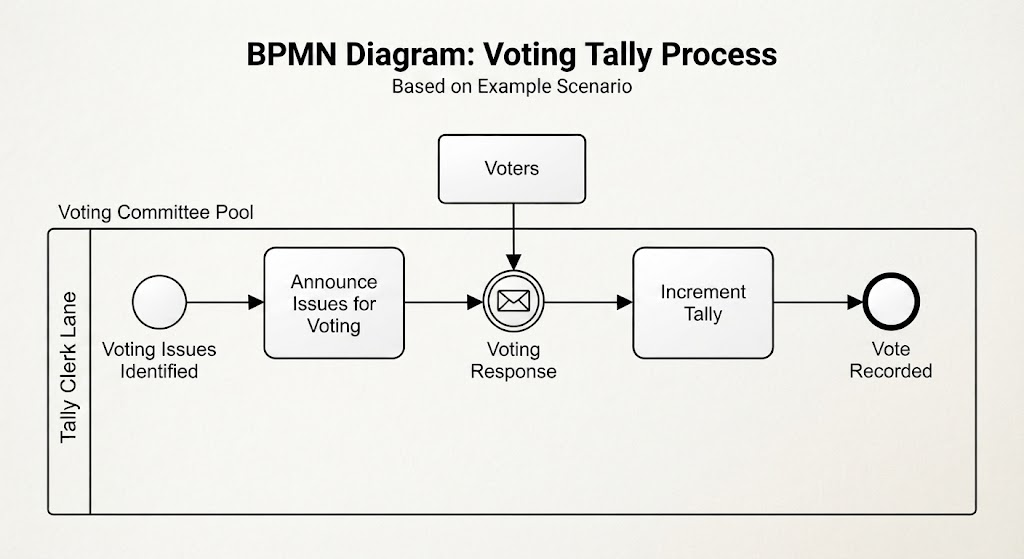
In the world of Business Process Model and Notation (BPMN), precision is paramount. A process diagram is not merely a picture of a workflow; it is a logic engine that dictates how work moves from initiation to completion. Today, we will dissect a classic example of workflow management: the Voting Tally Process. This tutorial will focus on a critical but often misunderstood element: Intermediate Events placed directly on the sequence flow.
Understanding the Context: The Voting Tally Scenario
Imagine a committee responsible for making decisions. The process begins when specific issues are identified for a vote. The committee announces these issues, and then, the system must wait for the “Voters” (external participants) to submit their responses. Once a response is received, the tally is updated. Finally, the process concludes with the vote being recorded.
This scenario provides a perfect backdrop for understanding how BPMN handles time, waiting, and external data entry without breaking the flow of the process.
The Anatomy of the “Tally Clerk Lane”
Looking at the diagram, we see a container labeled Voting Committee Pool, which houses the internal operations. Within this pool, there is a vertical lane labeled Tally Clerk Lane. In BPMN, lanes are used to organize activities by role or department. This indicates that the tasks inside the rectangle—Announce Issues, Increment Tally, and the events connecting them—are the responsibility of the Tally Clerk.
Step-by-Step Flow Analysis
The process moves linearly from left to right, governed by the sequence flows (the arrows). Let’s break down the journey:
- Start of the Process: The circle on the far left represents the Start Event. The label below it, “Voting Issues Identified,” tells us the trigger for the entire workflow. Once the issues are known, the process can begin.
- The First Task: The first rectangular box, Announce Issues for Voting, is a Task. This is an action performed by the Tally Clerk to inform the voters that a decision is needed.
- The Intermediate Event (The Core Concept): After the announcement, the flow hits a circle with an envelope icon inside. This is an Intermediate Message Event (Catching). This is the most critical part of the architecture. It acts as a “pause” button. The process cannot move forward until a specific event occurs. In this case, it is waiting for a “Voting Response” from the external “Voters” pool.
- The Second Task: Once the envelope icon is triggered (meaning a vote has been received), the process continues to the next box: Increment Tally. This task represents the logic of adding the received vote to the running count.
- End of the Process: Finally, the double-bordered circle labeled “Vote Recorded” indicates the End Event. The process is now complete.
Deep Dive: Intermediate Events in Normal Flow
The diagram illustrates a specific category of BPMN modeling: Intermediate Events in Normal Flow. These are events placed directly on the sequence flow between activities. It is vital to understand what distinguishes this from other types of events.
1. The “Happy Path” vs. Exceptions
Many students confuse intermediate events with error handling or exceptions. However, in this diagram, the intermediate event is part of the “happy path”—the standard, expected route of the process. The receipt of a vote is not a glitch; it is a necessary, integral step. The process must wait for this data to proceed. It does not divert the flow to a different path; it simply marks a point where time passes or data is exchanged.
2. The Mechanics of the Message Event
The envelope icon specifically denotes a Message Event. In the context of the Voting Tally Process, this represents the “Catch” operation.
- Catching: The process stops and waits. It is like a receptionist waiting for a phone call.
- Throwing: (Not shown here, but implied in other contexts) The process sends a signal. This would be like the Clerk sending an email to the voters.
Why This Architecture Matters
Understanding this specific configuration is essential for system architects and business analysts for several reasons:
- Clarity of Responsibility: By placing the event in the “Tally Clerk Lane,” we confirm that the Clerk is responsible for monitoring the incoming votes and updating the tally, even though the actual voting happens in the “Voters” pool.
- Asynchronous Handling: This model acknowledges that the process is asynchronous. The Clerk does not need to stand and watch the voting screen; the system waits for the data to arrive naturally before the next task begins.
- Process Integrity: By using an intermediate event rather than a gateway (decision diamond), we ensure that the process cannot skip the voting step. It enforces the rule that “a tally cannot be incremented without a vote.”
Conclusion
The Voting Tally Process is a textbook example of how BPMN handles the intersection of human action and system waiting. By utilizing an Intermediate Message Event on the normal flow, the diagram elegantly captures the reality that some processes must pause to gather data before they can continue. Whether you are mapping out a simple committee vote or a complex enterprise workflow, mastering these intermediate events is the key to creating robust, accurate system models.