


In the complex world of Enterprise Architecture, clarity is king. The TOGAF framework provides a robust methodology, but it can be easy to get lost in the jargon. One of the most critical distinctions to master is understanding how Deliverables, Artifacts, and Building Blocks relate to one another. This tutorial breaks down these concepts, explaining their unique roles in governance, description, and reuse.
1. The Hierarchy of Structure
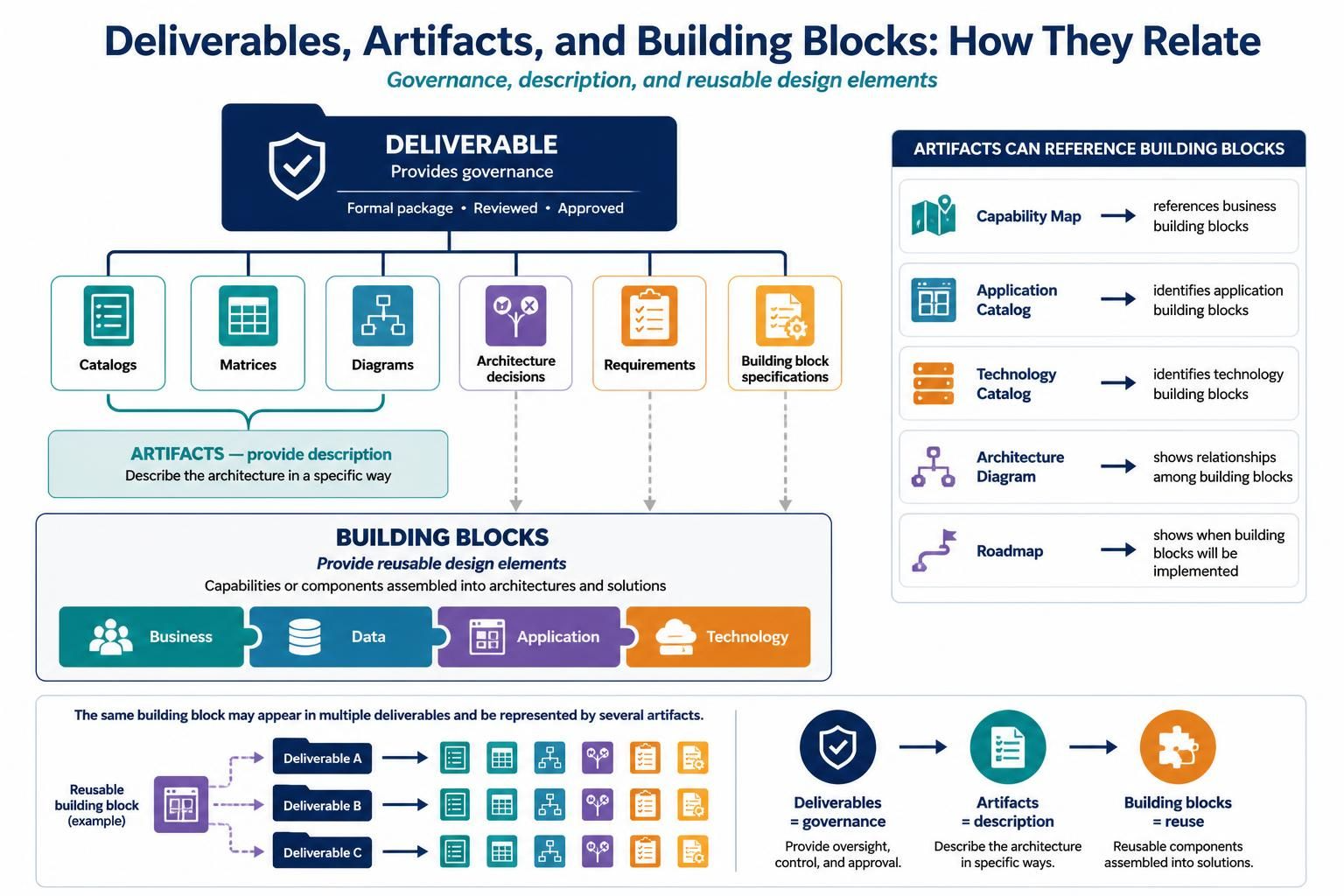
To understand how an architecture is built, we must look at the hierarchy of the documents and components that make up the project. The image provided illustrates a clear top-down flow.
Deliverables: The Governance Layer
At the top of the hierarchy sits the Deliverable. Think of a deliverable as a formal package or a container. It is the tangible output of an architecture project phase that requires review and approval.
- Function: It provides governance. It ensures that the work is being done according to standards and that the stakeholders agree with the direction.
- Examples: An Architecture Vision, a Statement of Architecture Work, or a complete Architecture Definition Document.
Artifacts: The Description Layer
Inside a deliverable, you will find Artifacts. If the deliverable is the “folder,” the artifacts are the specific “files” inside it. Artifacts are the descriptive elements that explain the architecture in a specific way.
The diagram categorizes artifacts into several types:
- Catalogs: Lists of items (e.g., a list of all applications).
- Matrices: Cross-references (e.g., mapping processes to applications).
- Diagrams: Visual representations (e.g., network topology or process flows).
- Architecture Decisions: Records of why specific choices were made.
- Requirements: Statements of what the system must do.
- Building Block Specifications: Detailed descriptions of the components.
2. Building Blocks: The Reusable Elements
At the bottom of the diagram is the foundation: Building Blocks. These are the actual components that make up the solution. They represent capabilities or components that can be assembled into architectures.
Building blocks are the “Lego bricks” of your solution. They are reusable design elements that fall into four primary categories:
- Business Building Blocks: Organizational units, business functions, or services.
- Data Building Blocks: Databases, data stores, and data structures.
- Application Building Blocks: Software systems, applications, or services.
- Technology Building Blocks: Hardware, networks, and infrastructure.
3. The Interconnected Relationship
The true power of TOGAF lies in how these three concepts interact. It is not a linear line; it is a web of references.
Artifacts Reference Building Blocks
While artifacts describe the architecture, they often do so by referencing specific building blocks. The diagram highlights this relationship with a dedicated section on the right:
- A Capability Map references Business Building Blocks to show what the organization can do.
- An Application Catalog identifies Application Building Blocks.
- A Technology Catalog identifies Technology Building Blocks.
- An Architecture Diagram visualizes the relationships among these building blocks.
- A Roadmap shows the timeline for when building blocks will be implemented.
One Block, Many Descriptions
Crucially, the diagram notes that “The same building block may appear in multiple deliverables.” A single Application Building Block (like a CRM system) might be:
- Listed in a Capability Map (as a business enabler).
- Defined in an Application Catalog (as a technical asset).
- Referenced in a Requirements Document (as a mandatory solution).
This demonstrates that artifacts provide the description, deliverables provide the governance, and building blocks provide the reuse.
Conclusion
Mastering the distinction between deliverables, artifacts, and building blocks is essential for effective architecture management. By separating the governance (deliverables) from the description (artifacts) and the actual solution components (building blocks), architects can maintain clarity and agility.
To effectively manage these complex relationships, especially the cross-referencing of artifacts and the lifecycle of building blocks, it is highly recommended to utilize specialized tooling. For a robust solution that supports the TOGAF ADM cycle and visualizes these connections, the Visual Paradigm TOGAF ADM Tool is the industry-leading choice. It allows you to automate the generation of these artifacts and ensures your building blocks are consistently maintained across all deliverables.
Related posts:
 Mastering Modern Agility: A Tutorial on Minimum Viable Architecture and the Digital Emergence Journey
 Mastering the TOGAF ADM Cycle: A Visual Guide to Enterprise Architecture Modeling
 Demystifying the TOGAF Foundation: A Comprehensive Guide to Fundamental Content
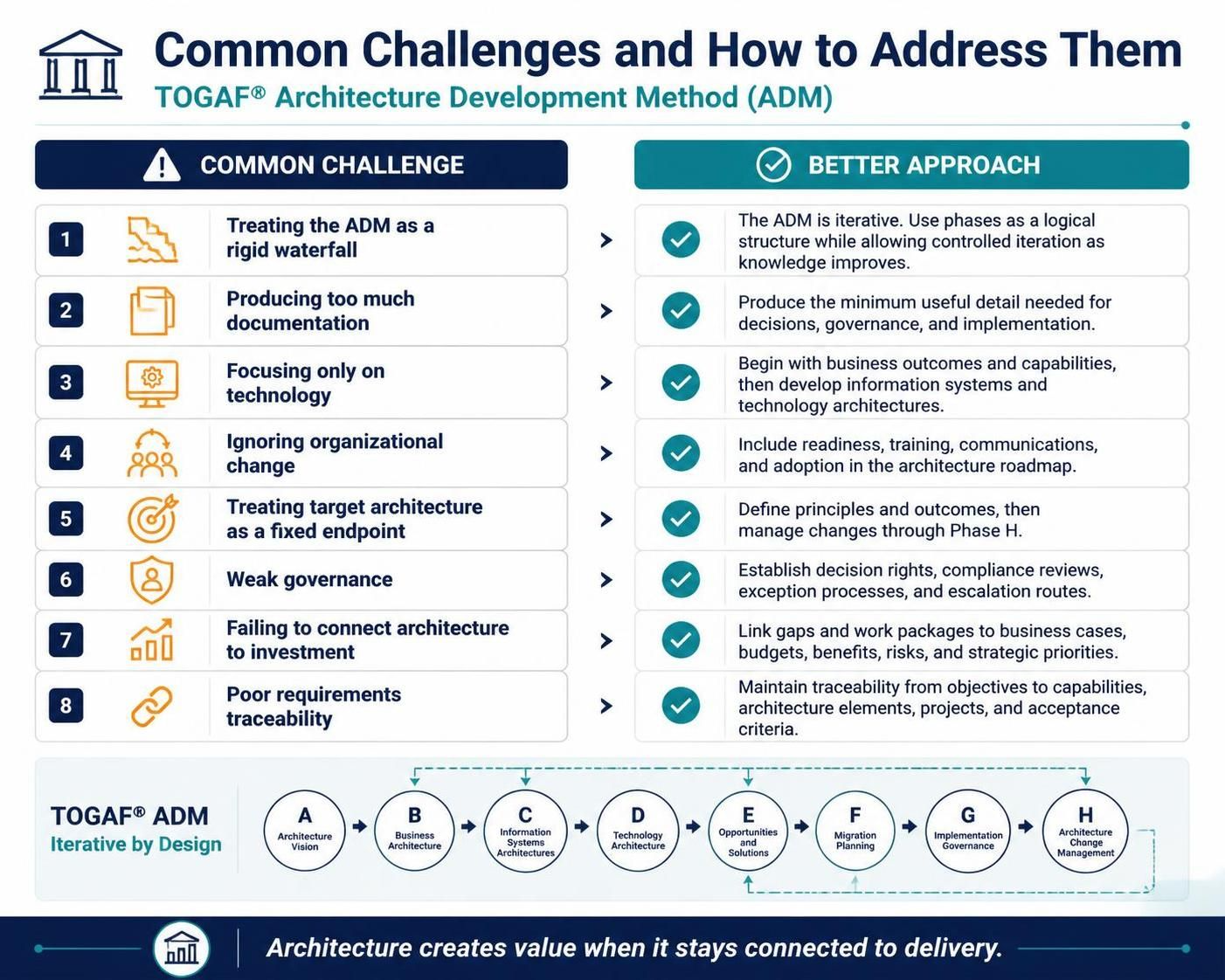 Mastering the TOGAF ADM: Overcoming 8 Common Implementation Challenges