In the world of business process modeling, clarity is currency. Whether you are a business analyst mapping out a new workflow or a developer designing a complex software integration, understanding the visual language of your diagrams is paramount. One of the most powerful tools for this is the BPMN (Business Process Model and Notation) diagram, specifically the use of Pools and Lanes.
This tutorial breaks down the structural foundation of swimlane diagrams, explaining how they separate external entities from internal departments and how they reveal the true “responsibility map” of a business process.
1. The Big Picture: Defining Pools
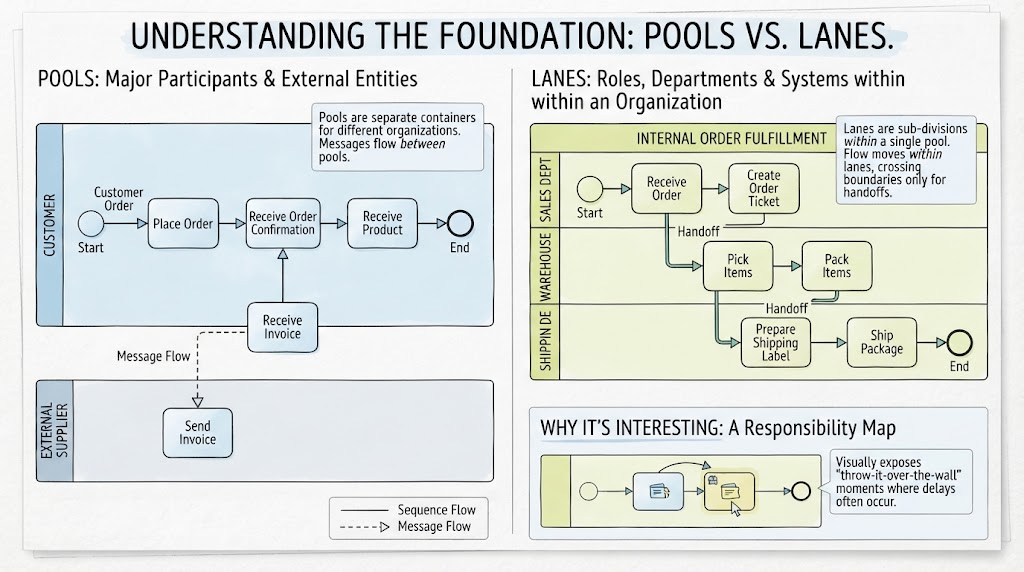
At the highest level of abstraction, a Pool represents a major participant in a process. Think of a pool as a container that holds the entire process flow for a specific entity. In the context of a supply chain or an order fulfillment system, pools are used to distinguish between different organizations.
Key Characteristics of Pools:
- Major Participants: These represent distinct legal or operational entities, such as a Customer, a Supplier, or a Company.
- Separate Containers: Each pool is a self-contained environment. The internal logic of one organization does not dictate the logic of another.
- External Boundaries: Pools act as the borders between different organizations.
2. The Internal Structure: Defining Lanes
Once you are inside a specific pool, the diagram becomes more granular. Lanes are the sub-divisions within a single pool. While a pool represents an organization, a lane represents a specific role, department, or system within that organization.
Key Characteristics of Lanes:
- Roles and Departments: In an “Internal Order Fulfillment” pool, you might see lanes for the “Sales Dept,” “Warehouse,” and “Shipping Dept.”
- Internal Flow: The flow of activity moves within lanes. This represents the standard operational steps taken by a specific department.
- Handoffs: Flow only crosses boundaries between lanes when a handoff occurs—when one department passes responsibility to another.
3. Connecting the World: Sequence Flow vs. Message Flow
One of the most common points of confusion for beginners is understanding the difference between the lines connecting activities. The diagram illustrates two distinct types of flows that dictate how processes interact.
Sequence Flow (Solid Lines)
Sequence Flow represents the order in which activities are performed. It is used to show the step-by-step progression of a task.
- Scope: It occurs within a single lane or pool.
- Example: In the Customer pool, the flow moves from “Place Order” to “Receive Order Confirmation.” This is a sequence of events happening to that specific entity.
Message Flow (Dashed Lines)
Message Flow represents the communication between participants. It indicates that information is being sent from one entity to another.
- Scope: It crosses between pools (external entities).
- Example: Notice the dashed line connecting the “External Supplier” pool to the “Customer” pool labeled “Receive Invoice.” This is not a step in the customer’s process; it is a message (the invoice) arriving from the supplier.
4. The “Why It’s Interesting” Factor: The Responsibility Map
Why do we bother drawing complex swimlanes instead of a simple flowchart? The answer lies in accountability. Swimlanes transform a standard flowchart into a Responsibility Map.
By visually separating who does what, swimlanes expose process inefficiencies that are often hidden in flat diagrams. Specifically, they highlight “Throw-it-over-the-wall” moments.
Identifying Bottlenecks
When you look at the handoffs between lanes (e.g., from Sales to Warehouse), you can instantly see where responsibility shifts. These are the moments where delays frequently occur. If a process gets stuck in a “handoff” zone, it is often because the communication channel (the message flow) is broken or the receiving department (the next lane) is understaffed.
Summary of Visual Elements
To recap the diagram’s structure:
- The Customer Pool: Shows the end-user experience, starting with “Place Order” and ending with “Receive Product.”
- The Supplier Pool: Shows the external interaction, specifically the “Send Invoice” task.
- The Internal Fulfillment Pool: A complex internal structure broken down into:
- Sales Dept: Initiates the process by creating order tickets.
- Warehouse: Picks and packs items.
- Shipping Dept: Prepares labels and ships packages.
By mastering the distinction between Pools (Who) and Lanes (What/Who Inside), you gain the ability to diagnose and optimize complex business systems with precision.