


Modern software engineering relies heavily on visual modeling to communicate complex system structures. One of the most powerful yet simple tools available for this purpose is PlantUML, a text-based diagramming language. When integrated into modern IDEs like VPasCode, it allows developers to write code that instantly generates professional UML diagrams.
In this tutorial, we will analyze a practical example of a Class Diagram. We will walk through the syntax, explore the fundamental concepts of Object-Oriented Programming (OOP) demonstrated here—specifically abstraction and inheritance—and learn how to read the resulting visualization.
Understanding the “Code-as-Diagram” Workflow
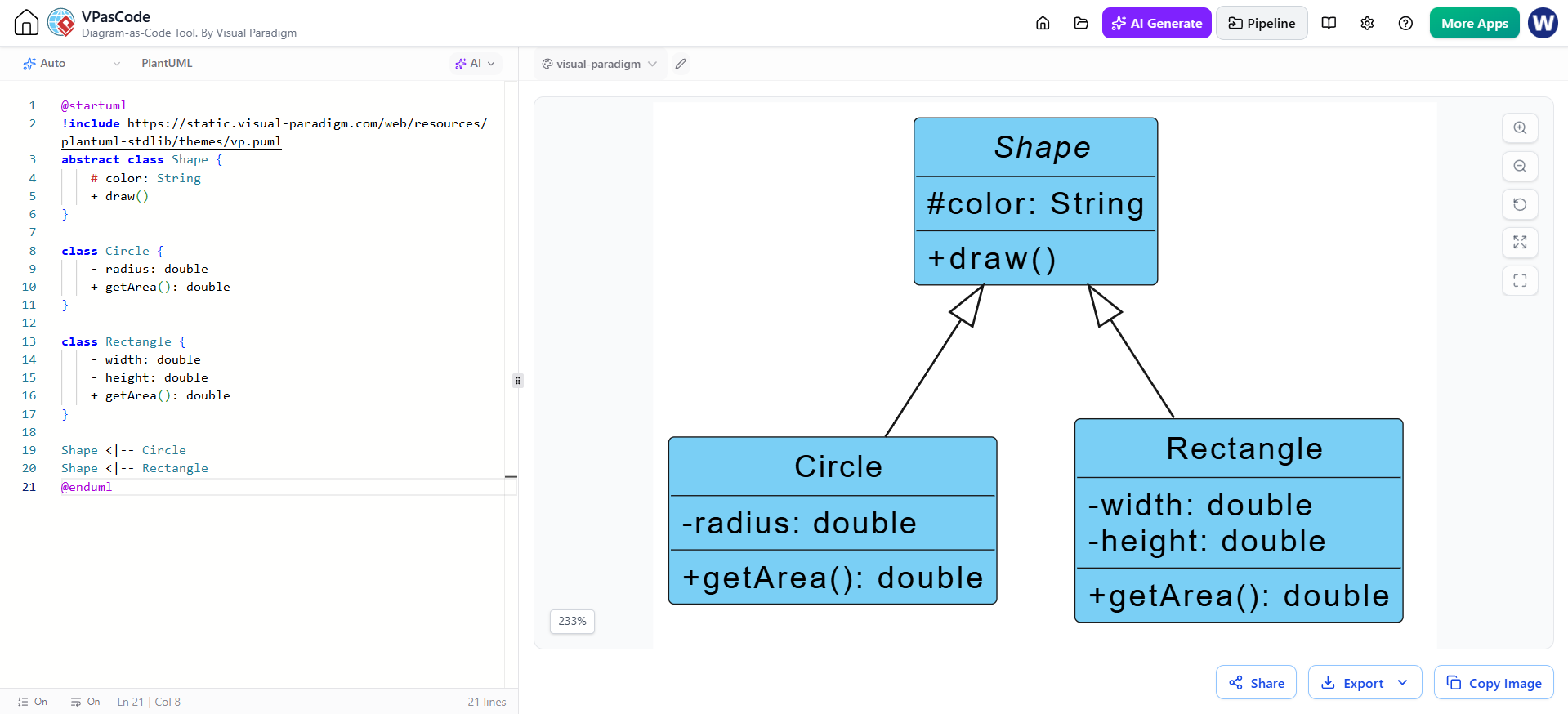
The image provided illustrates a split-screen interface common in VPasCode. On the left, you see the source code written in PlantUML. On the right, the tool renders this text into a visual Class Diagram. This workflow offers several advantages:
- Version Control Friendly: Unlike drag-and-drop tools, text-based diagrams can be easily tracked in Git repositories.
- Consistency: It prevents visual drift, ensuring that diagrams always match the actual code structure.
- Speed: Once the syntax is known, creating complex diagrams is faster than clicking shapes and lines.
Decoding the PlantUML Syntax
Let’s break down the code snippet provided in the editor to understand how we define a class and its relationships.
1. The Abstract Superclass: Shape
The first block of code defines a parent class:
 abstract class Shape {
     # color: String
     + draw()
 }
This snippet demonstrates three critical OOP concepts:
- Abstract Classes: By declaring
abstract class Shape, we are defining a blueprint that cannot be instantiated on its own. You cannot create a generic “Shape” object; you can only create specific shapes like Circles or Rectangles. - Visibility Modifiers:
#(Protected): The attributecoloris marked with a hash. This means it is accessible within the class itself and its subclasses, but not from the outside world.+(Public): The methoddraw()is public, meaning any other part of the system can call this method.
- Method Signatures: The
draw()method has no return type listed, implying it performs an action (void) rather than calculating a value.
2. The Concrete Subclasses: Circle and Rectangle
Next, we define the specific implementations:
 class Circle {
     - radius: double
     + getArea(): double
 }
 class Rectangle {
     - width: double
     - height: double
     + getArea(): double
 }
Here, we see the concept of encapsulation. The attributes (radius, width, height) are marked with a - (Private), meaning they are hidden from external access. The public method getArea(): double allows the system to retrieve the calculated area without exposing the internal math logic.
Visualizing the Relationship: Inheritance
The most crucial part of this diagram is the relationship defined at the bottom:
 Shape <|-- Circle
 Shape <|-- Rectangle
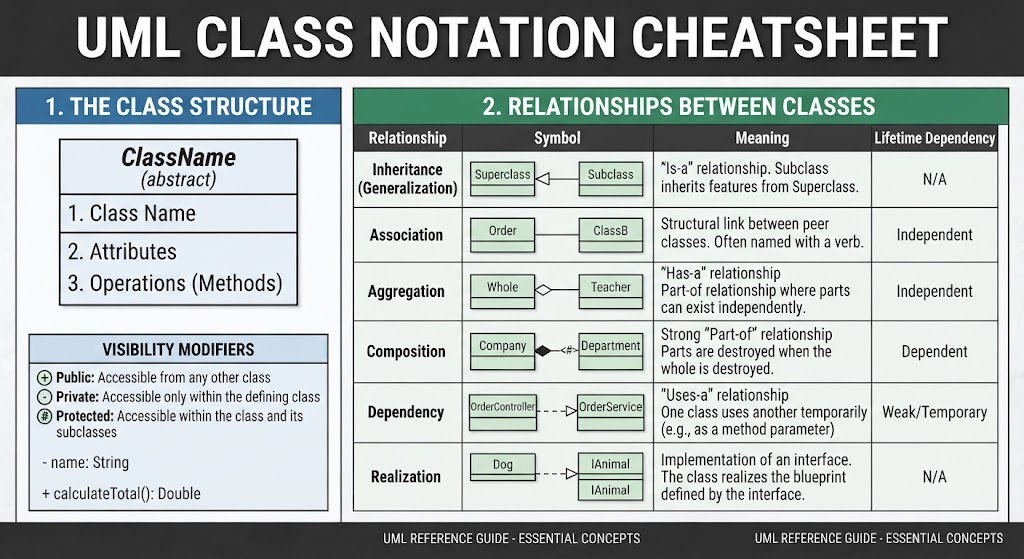
The syntax <|-- is the specific PlantUML notation for Generalization (Inheritance). This arrow points from the subclass to the superclass, reading as "is-a".
Interpreting the Rendered Diagram
On the right side of the image, the VPasCode engine has translated the text into a blue, graphical hierarchy:
- The Hierarchy:
Shapesits at the top as the parent node. - The Connection: The solid lines ending in hollow triangles (arrowheads) pointing up to
Shapeindicate thatCircleandRectangleinherit fromShape. - The "Is-A" Logic: This visual confirms that a
Circleis aShape, and aRectangleis aShape.
Why This Matters for System Architecture
This simple example illustrates the foundation of Polymorphism. In a larger system, you could create a list of Shape objects. Because both Circle and Rectangle inherit from Shape, the system can call draw() on any item in that list, and the correct version (the circle drawing itself, or the rectangle drawing itself) will execute automatically.
By using VPasCode and PlantUML, developers can design these architectural patterns early in the development process, ensuring that the class hierarchy is sound before writing the actual Java, C#, or Python code.
Related posts:
 Revolutionizing System Modeling: The Power of Instant AI Diagram Generation
 The Evolution of UML: Mastering the Modern Architecture Stack from Drag-and-Drop to Diagrams as Code
 Mastering System Design: A Deep Dive into Visual Paradigm Community Edition
 Mastering UML Class Diagrams: A Comprehensive Guide to Structure and Relationships