In the world of Business Process Model and Notation (BPMN), efficiency is key. When modeling real-world accounting scenarios, you rarely encounter processes that are strictly linear. Often, a single logical step in a high-level diagram actually represents a complex, repetitive cycle of actions. This tutorial explores a classic example of this: the Invoice Reconciliation Process, specifically focusing on how to model a Looped Task using Multi-Instance logic.
Understanding the Scenario
Imagine an accounts payable department. An accountant receives an invoice and a corresponding Purchase Order (PO). Their job is to ensure that what the vendor billed matches exactly what was ordered and received.
If the Purchase Order contains 50 distinct line items, the accountant cannot simply “check” the document once. They must iterate through the list, verifying Item 1, then Item 2, and so on, until Item 50 is complete. This is a perfect candidate for a Looped Task.
Deconstructing the Process Flow
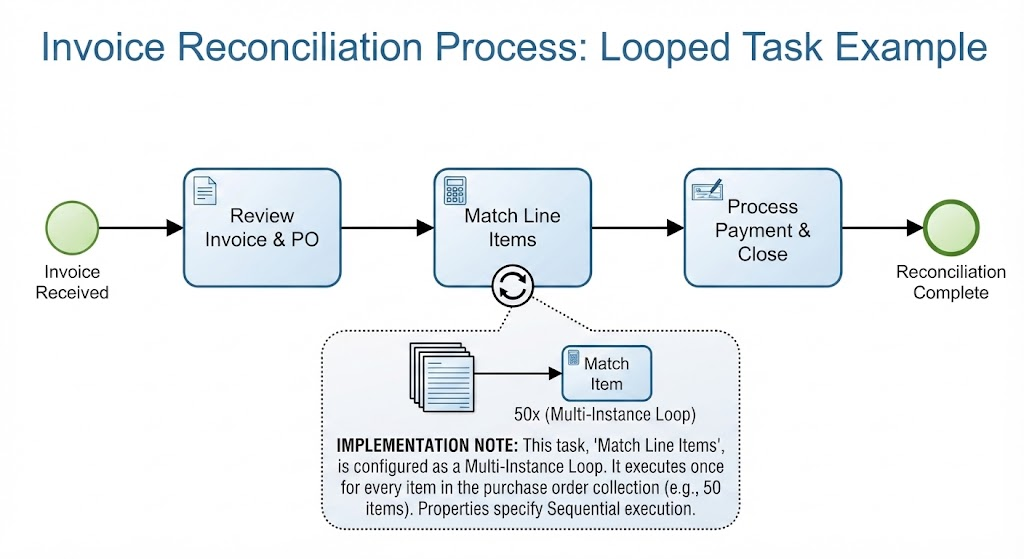
Let’s break down the diagram shown in the example into its constituent parts to understand the flow from start to finish.
1. The Start Event
The process begins with a green circle labeled Invoice Received. In BPMN, this is the Start Event. It signifies that the trigger has occurred—the physical or digital document has arrived in the system, and the workflow can now proceed.
2. The Initial Review (Standard Task)
The first step is a standard task: Review Invoice & PO. This is an atomic action. It is a single, indivisible step where the user performs a high-level check to ensure the documents are legible and belong to the correct order. Once this is done, the process flows linearly to the next stage.
3. The Looped Task: “Match Line Items”
This is the core of our architecture. The task is labeled Match Line Items, but it features a specific icon: a circle with two arrows forming a loop at the bottom.
- The Loop Marker: This visual indicator tells the BPMN engine that this task is not a one-time event. It is a container for repeated execution.
- The Logic: The system is instructed to execute this task $N$ times, where $N$ is the number of items in the collection (e.g., the 50 items on the PO).
Deep Dive: Multi-Instance Logic
The diagram provides a detailed view of what happens inside the loop. This is where the magic of BPMN iteration occurs.
The Collection
Notice the stack of documents icon in the expanded view. This represents the Collection—the list of data (the 50 items) that the process needs to iterate over. The process engine reads this collection, takes the first item, and passes it to the task.
The Iteration
Inside the loop, the specific action is defined as Match Item. This is a granular sub-task. While the high-level view says “Match Line Items,” the detailed view reveals the engine is actually executing “Match Item” 50 times.
The notation 50x (Multi-Instance Loop) explicitly defines the cardinality of the loop. This configuration ensures that:
- The loop does not run forever; it is bounded by the data size.
- The loop runs sequentially (one item after another), ensuring data integrity for each match.
Conclusion: The Final Task
Once the loop completes its execution (having matched all 50 items), the process flow exits the loop and proceeds to the final task: Process Payment & Close. Finally, the process hits the End Event, marked by a green double circle, indicating the Reconciliation Complete status.
Key Takeaways for Modelers
When building your own BPMN diagrams, remember the distinction between simple tasks and looped tasks:
- Tasks are for simple, atomic steps (e.g., “Review Invoice”).
- Sub-Processes are for complex, compound logic where you want to group steps together.
- Looped Tasks (Multi-Instance) are the engine for repetitive logic. They allow you to keep your diagram readable by hiding the repetitive nature of the work until the user needs to see the details.
By correctly applying Multi-Instance loops, you ensure your diagrams remain readable regardless of the complexity of the underlying business rules, telling a clear story of the business narrative.