In the realm of Business Process Model and Notation (BPMN), creating a smooth, happy-path workflow is just the beginning. The true power of process modeling lies in its ability to anticipate and manage the unexpected. This tutorial dissects a sophisticated BPMN diagram: a Loan Application Process with Exception Handling. We will walk through the architecture, analyze the specific modeling constructs used to manage errors, and explain why this structure is critical for robust business logic.
Understanding the Architecture: A Dual-Path System
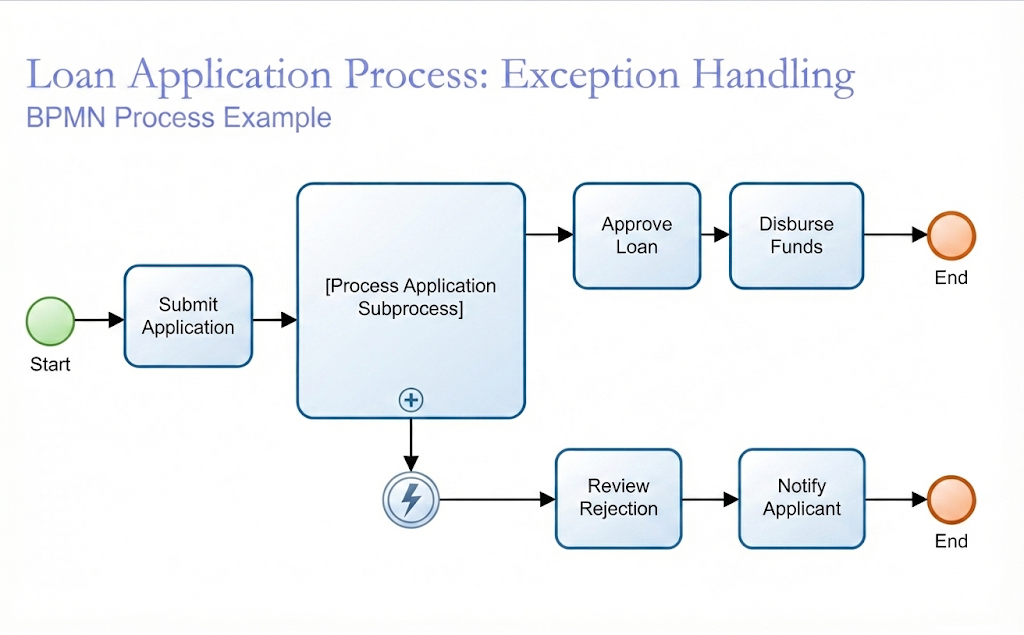
The diagram presented illustrates a classic “split-and-join” architecture, although in this specific case, the join is implicit via the end events. The process is bifurcated into two distinct branches:
- The Success Path (Top): Represents the standard flow where the application is processed, approved, and funds are disbursed.
- The Exception Path (Bottom): Represents the error handling logic, triggered when validation fails or the application is rejected.
This separation ensures that the system does not attempt to disburse funds for a rejected loan, maintaining data integrity and business rules.
1. The Initiation Phase
The process begins with a Start Event (the green circle). This is the trigger point, likely an external event such as a customer clicking “Submit” on a web portal or a bank employee uploading a file. This leads immediately into a task labeled Submit Application.
2. The Core Subprocess
The heart of the diagram is the large rectangle labeled [Process Application Subprocess]. In BPMN, this is a Subprocess element, indicated by the small plus (+) symbol in the bottom center of the box.
Why use a Subprocess?
Complex processes like loan validation often contain dozens of individual steps (e.g., checking credit score, verifying income, assessing collateral). Instead of cluttering the main diagram with these details, we encapsulate them inside this subprocess. It acts as a modular black box: inputs go in, logic is executed, and outputs flow out.
Deep Dive: The Error Boundary Event
The most critical technical element in this diagram is the Intermediate Catching Event with an Error Boundary (the circle with the lightning bolt symbol). It is attached to the bottom of the [Process Application Subprocess].
What is an Error Boundary Event?
An error boundary event is a specialized type of Intermediate Catching Event. It is used to monitor a specific activity or subprocess for errors. Here is how it functions:
- Monitoring: While the [Process Application Subprocess] is executing, the system is simultaneously watching the error boundary event.
- Triggering: If an error occurs inside the subprocess (such as a database connection failure, a validation rule breach, or a missing document), the standard flow is interrupted.
- Catching: The error boundary event “catches” this exception. It acts as a safety net, preventing the process from crashing and redirecting it to a specific error-handling workflow.
Key Technical Concept: This is a Non-Interrupting or Interrupting behavior depending on configuration, but typically in this context, it implies an interrupt. The moment the error is caught, the flow leaves the subprocess and travels along the sequence flow to the error handling branch.
3. The Exception Handling Path
Once the error event is triggered, the process moves to the bottom branch:
- Review Rejection: This task represents the human or automated review of the failed application. Perhaps a loan officer needs to manually inspect why the credit score was insufficient.
- Notify Applicant: Once the rejection is finalized, the system sends a notification to the customer, explaining the status.
- End Event: The process concludes with a red/orange circle, indicating that the successful disbursement did not happen.
Comparing the Success Path
For the process to continue to the top path, the [Process Application Subprocess] must complete successfully without triggering the error boundary event.
- Approve Loan: If no errors occur, the process assumes the loan is valid. This task likely involves final policy checks.
- Disburse Funds: The ultimate goal of the process. Funds are transferred to the applicant.
- End Event: The process completes successfully.
Why This Modeling Matters
This diagram demonstrates a mature approach to software and business process design. By explicitly modeling the Error Event, the organization ensures that:
- Resilience: The system handles failures gracefully rather than crashing.
- Traceability: We can clearly see exactly what happens when things go wrong.
- Clarity: Stakeholders can distinguish between the “happy path” (success) and the “exception path” (failure) without ambiguity.
By using the Subprocess to encapsulate the complex logic and the Error Boundary Event to handle exceptions, this model serves as a perfect blueprint for developers and business analysts working on loan management systems.